PowerGuide
Installation manual | English
v3.10022025
- Installation Overview
- Introduction
- Safety instructions
- Support
- Inside the Box
- Optional equipment
- Pre-requisites for installation
- Overview of the installation steps
- Steering Controller Installation
- Technical specification
- Define the Steering Controller position
- Prepare the Plastic Plate
- Mount the Plastic Plate on the bonnet
- Install Steering Controller on the bonnet
- Mount the Plastic Plate on the roof
- Install the Steering Controller on the Plastic Plate on the roof
- PowerTablet installation
- Technical specification
- Mount the Tablet Holder
- Fix the handle to the handle ball
- Mount the PowerTablet Holder to the handle
- Fix the PowerTablet Holder to the handle
- Install SIM Card to PowerTablet
- Install Battery to PowerTablet
- Mount the PowerTablet in the Tablet Holder
- Base Station installation
- Cable installation
- Cable installation overview
- Connect with the Cable
- Connect the Steering Controller with the Cable
- Connect the Cable with the cigarette lighter socket
- Connect the PowerTablet with the Cable
- Turn on the power supply
- Versions and updates
- Datasheet
Installation Overview
Introduction
FieldBee PowerGuideis an ultra-modern tractor guidance system created together with farmers. The RTK high-precision Receiver and Steering Controller and FieldBee Navigation App, developed specifically for agriculture, work together to make precision driving, field mapping, data collection and much more not only possible, but extremely easy and efficient.
FieldBee PowerGuide fits mosts tractors and can be seam- lessly transfered between machines thanks to short installation time and profile memory in the App. |
You can horizontally scroll the table on mobile.
|
|
|
You can horizontally scroll the table on mobile. |

Safety instructions
Introductory remarksTo understand the potential hazards associated with the operation of a PowerGuide equipped vehicle, read carefully the provided documentation prior to installing or operating the PowerGuide system on a vehicle. Please bear in mind that the safety instructions are for reference only and do not cover all possible hazardous and dangerous conditions.
The FieldBee PowerGuide system installer and manufacturer disclaim any responsibility for damage or physical harm caused by failure to adhere to the following safety requirements.
|
You can horizontally scroll the table on mobile.
|
|
NOTE: |
|
WARNINGThe PowerGuide system installer and manufacturer disclaim any responsibility for damage or physical harm caused by failure to adhere to the following safety requirements:
As the operator of the vehicle, you are responsible for its safe operation. The PowerGuide system is not designed to replace the vehicle’s operator. |
|
|
To understand the potential hazards associated with the operation of a PowerGuide equipped vehicle, read the provided documentation prior to installing or operating the PowerGuide system on a vehicle. |
|
|
To prevent accidental death or injury from being run over by the vehicle, never leave the vehicle’s operator seat with the PowerGuide system engaged. |
|
|
To prevent accidental death or injury from being run over by the vehicle, verify that area around the vehicle is clear of people and obstacles before startup, calibration, tuning, or use of the PowerGuide system. |
 |
|
To prevent the accidental engagement of the PowerGuide system and loss of vehicle control, power down the PowerGuide system while driving on roads. Never drive on roads or in public areas with the PowerGuide system powered up. |
|
|
Verify that you are in a stable position on the vehicle’s platform or stairs when installing or removing the antenna assembly on top of the cab, so you do not fall. If the vehicle does not provide a safe platform, use a ladder to safely access the vehicle’s roof. |
|
|
To avoid electrical shock hazards, remove the antennas from the vehicle before driving under low structures or low electrical power lines. |
|
|
If the installation requires working on the hydraulic system on the vehicle, read and understand the hydraulic sections of the vehicle manufacturer’s operators manual before starting the installation. Wear hand and eye protection while performing hydraulic system maintenance. Relieve hydraulic system pressure before servicing the hydraulic system. |
|
CAUTIONThe PowerGuide system does not detect obstacles in the vehicle’s path. The vehicle operator must observe the path being driven and take over steering manually if an obstacle must be avoided. |
|
|
The PowerGuide system does not control the speed of the vehicle. The operator must manually adjust the speed of the vehicle to keep the vehicle safely under control. |
|
|
The PowerGuide system must be powered OFF when installing or removing the PowerGuide, or any other components connected to the PowerGuide system. |
 |
Installation Safety MeasuresThe PowerGuide system must be powered OFF when installing or removing the PowerGuide, or any other components connected to the PowerGuide system. |
|
|
Verify that you are in a stable position when installing or removing the Steering Controller on the roof so you do not fall down. If the vehicle does not provide a safe platform, use a ladder to safely access the vehicle’s roof. |
|
|
To prevent accidental death or injury from being run over by the vehicle, verify that area around the vehicle is clear of people and obstacles before installation, calibration, tuning, or use of the PowerGuide system. |
|
|
Keep the equipment away from high-power wireless equipment such as wireless transmitters, radar transmitters, high frequency and current devices, and microwaves. |
|
|
Do not install the product in an environment with high temperature, heavy dust, harmful gas, flammable substances, explosive substances, electromagnetic interference (large radar station, transmitter station, substation), unstable voltage, high vibration, or loud noise; otherwise, the equipment may be unable to operate normally. |
|
|
Do not install the equipment in places vulnerable to water accumulation, water seepage, water dripping, condensation, etc., so as to prevent the equipment from being damaged by water accumulated at the interface. |
|
|
If the equipment is operated in an environment with high relative humidity, insulation materials may be degraded to cause electric leakage; the mechanical properties of materials may be changed and metal parts may become rusty. |
|
|
After the equipment has been installed, do not remove it frequently as this may lead to unexpected damage. |
|
|
When connecting the power cable to the battery, connect the terminals of the power line to the positive and negative terminals of the battery accordingly. |
|
Operation SafetyTo prevent accidental death or injury from being run over by the vehicle, never leave the vehicle’s operator seat with the PowerGuide system engaged.
The PowerGuide system does not control the speed of the vehicle. The operator must manually adjust the speed of the vehicle to keep the vehicle safely under control. |
|
|
|
You can horizontally scroll the table on mobile. |
















Support
Support
The FieldBee Team is happy to help farmers with any questions they may have about FieldBee products.
Our specialists provide free online service from Monday to Friday from 9:00 to 18:00 CET.
Feel free to contact us via:
Please kindly attach materials related to the questions (such as photos, screen-shots, or videos). This will speed up the process of providing support assistance. |
You can horizontally scroll the table on mobile.
|
|
|
You can horizontally scroll the table on mobile. |

Inside the Box
|
Information
PowerGuide Controller (1)
an Integrated RTK Receiver and Steering Controller is a high-precision electronic controller that provides automatic steering capability to the vehicle. Controller Mounting Plate (2)
a plastic stand that allows easy fixation of the Steering Controler on a tractor. Cable (3)
a dedicated set of cables and plugs that connects the various parts of the equipment, responsible for energy transmission.
|
You can horizontally scroll the table on mobile.
|
|
|
You can horizontally scroll the table on mobile. |

Optional equipment
|
You get these items if you ordered them as an additon to the basic equipment. PowerTablet (1)
PowerTablet Holder (2)
RTK Base Station (3)
|
You can horizontally scroll the table on mobile.
|
|
|
You can horizontally scroll the table on mobile. |

Pre-requisites for installation
|
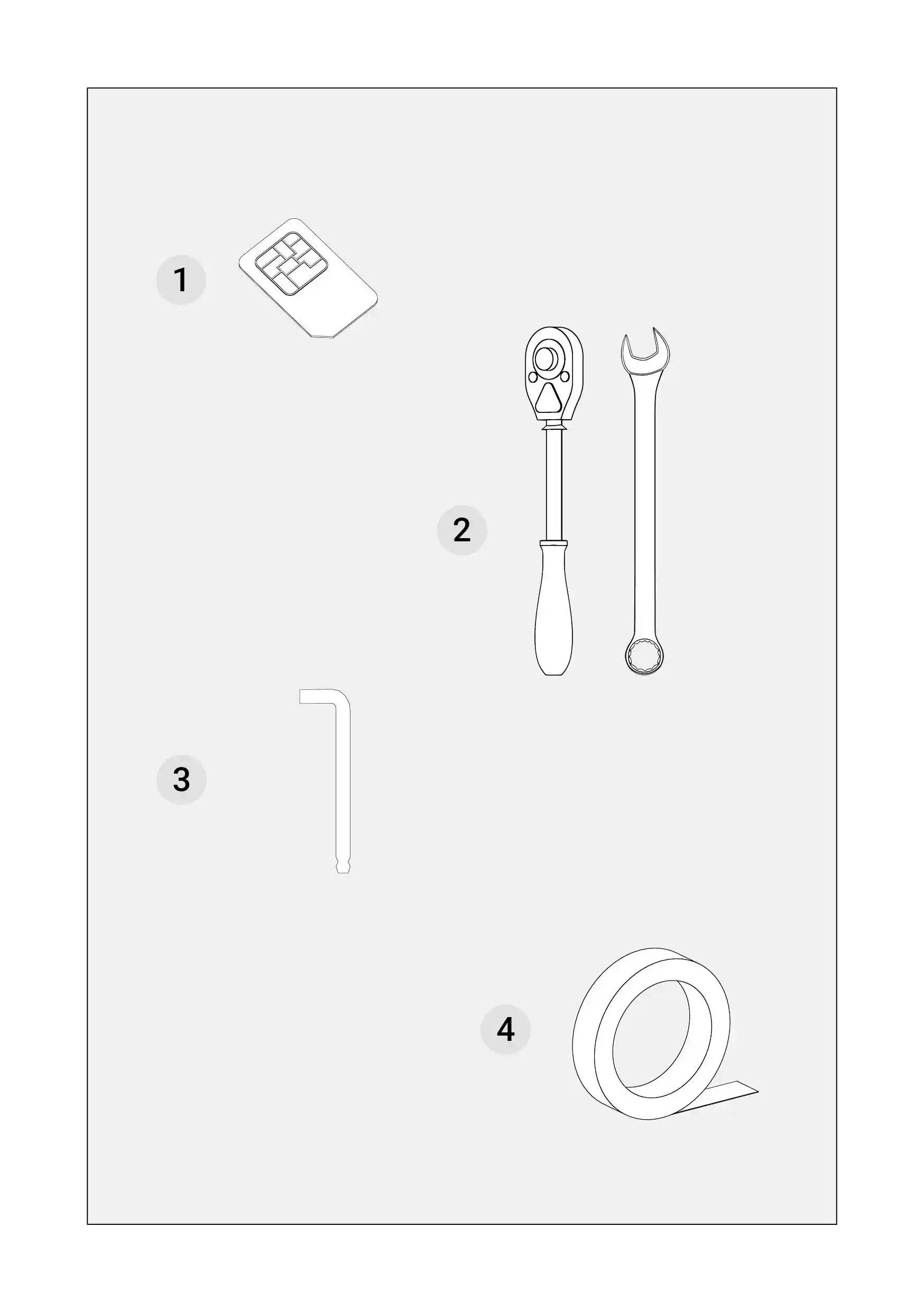
You get these items if you ordered them as an additon to the basic equipment. SIM Card (1)
Socket Wrench (2)
Hex Key (3)
Double-sided tape (4)
Cross Tip Screwdriver (5)
A measuring tape (6)
A level (7)
A ladder (8)
|
You can horizontally scroll the table on mobile.
|
|
|
You can horizontally scroll the table on mobile. |

Overview of the installation steps
|
This Installation Overview chapter contains a general description of each step of the installation process. The Installation manual has been designed to make the installation process easy and effortless. Each chapter of the manual comprises written instructions and visual illustrations.
The written instructions have been divided into the description of the equipment from the box and the required items necessary to successfully complete each step. Following that there is information on how to dismount, mount and connect specific equipment parts accordingly. Some steps have been provided with tips that will make the process even more straightforward.
Define the Steering Controller position - you are advised on the most suitable way to locate the best position for the Steering Controller.
Install the Plastic Plate - this step illustrates how to mount the plastic plate that works as the base for the Steering Controller. There are instructions in this manual for installation on the roof and the vehicle’s bonnet.
Connect with the Cable - you are provided with the instructions on connecting the equipment together. It contains information on the cables, plugs, and sockets of all the equipment parts. There are instructions on connecting all the equipment to an sure an electricity supply to all its parts.
Mount the Tablet Holder - in this step, you have instructions on assembling the parts of the Tablet Holder in the cabin and fixing it where it is comfortable to operate the Tablet.
Connect the Tablet with the Cable - the step contains instructions on safely connecting the Tablet with the Cable.
Measure the vehicle - the last step describes how to make measurements of the wheelbase, rear axle, Steering Controller height, and offsets so that they can be inserted into the FieldBee Navigation App.
|
You can horizontally scroll the table on mobile.
|
|
|
You can horizontally scroll the table on mobile. |

Steering Controller Installation
Technical specification
Accuracy and operating speed
GNSS Receiver
Communication
Dimensions
Power
Environmental & Compliance
Vehicle Compatibility
|
You can horizontally scroll the table on mobile.
|
|
|
You can horizontally scroll the table on mobile. |

Define the Steering Controller position
|
Information
---
Important!
|
You can horizontally scroll the table on mobile.
|
|
|
You can horizontally scroll the table on mobile. |

Prepare the Plastic Plate
|
Warning: It is very important for the Plastic Plate to be mounted on an ideally flat position for the navi-gation system operate accurately. In the package:
Required tools
Prepare the Plastic Plate
|
You can horizontally scroll the table on mobile.
|
|
|
You can horizontally scroll the table on mobile. |

Mount the Plastic Plate on the bonnet
|
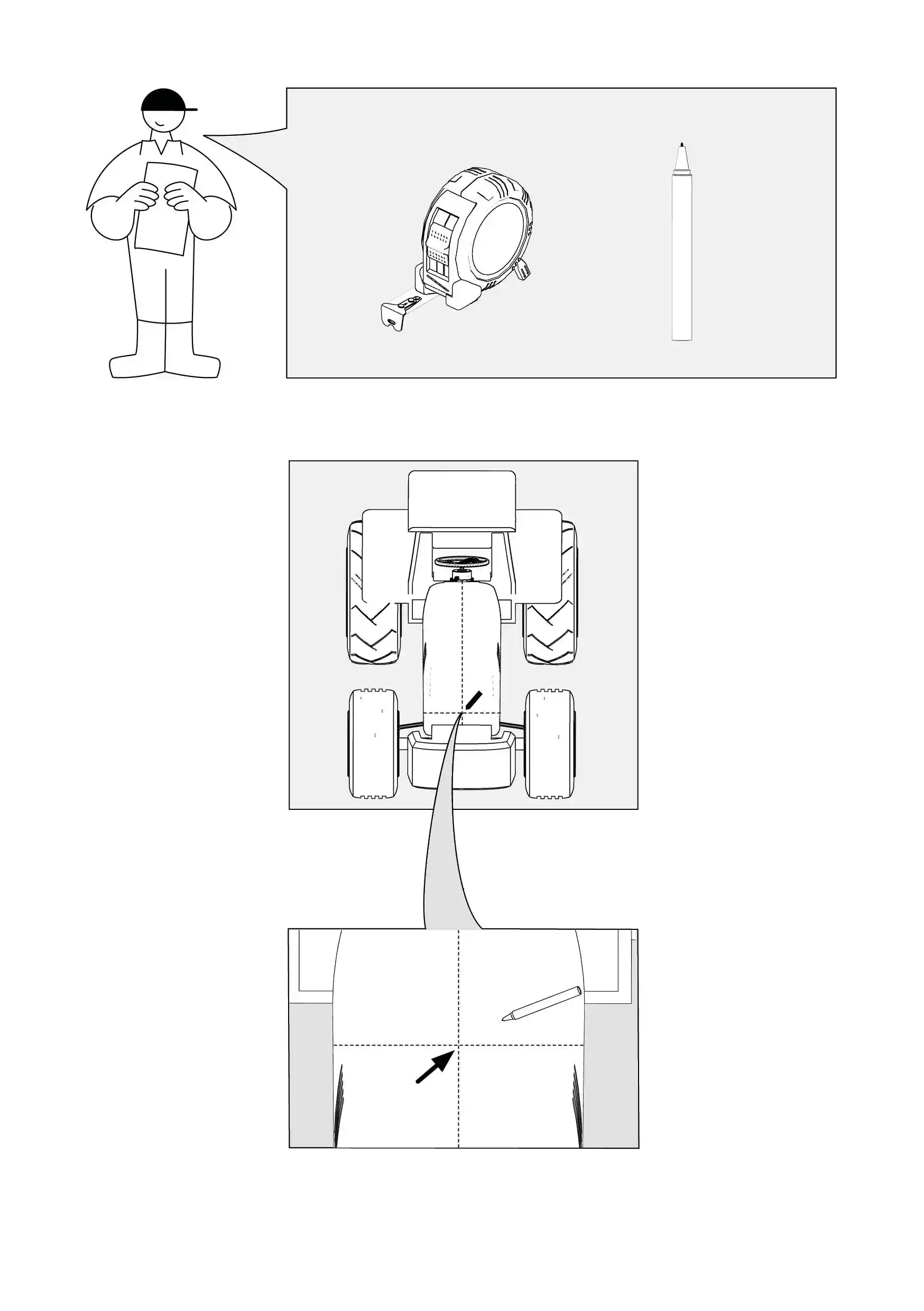
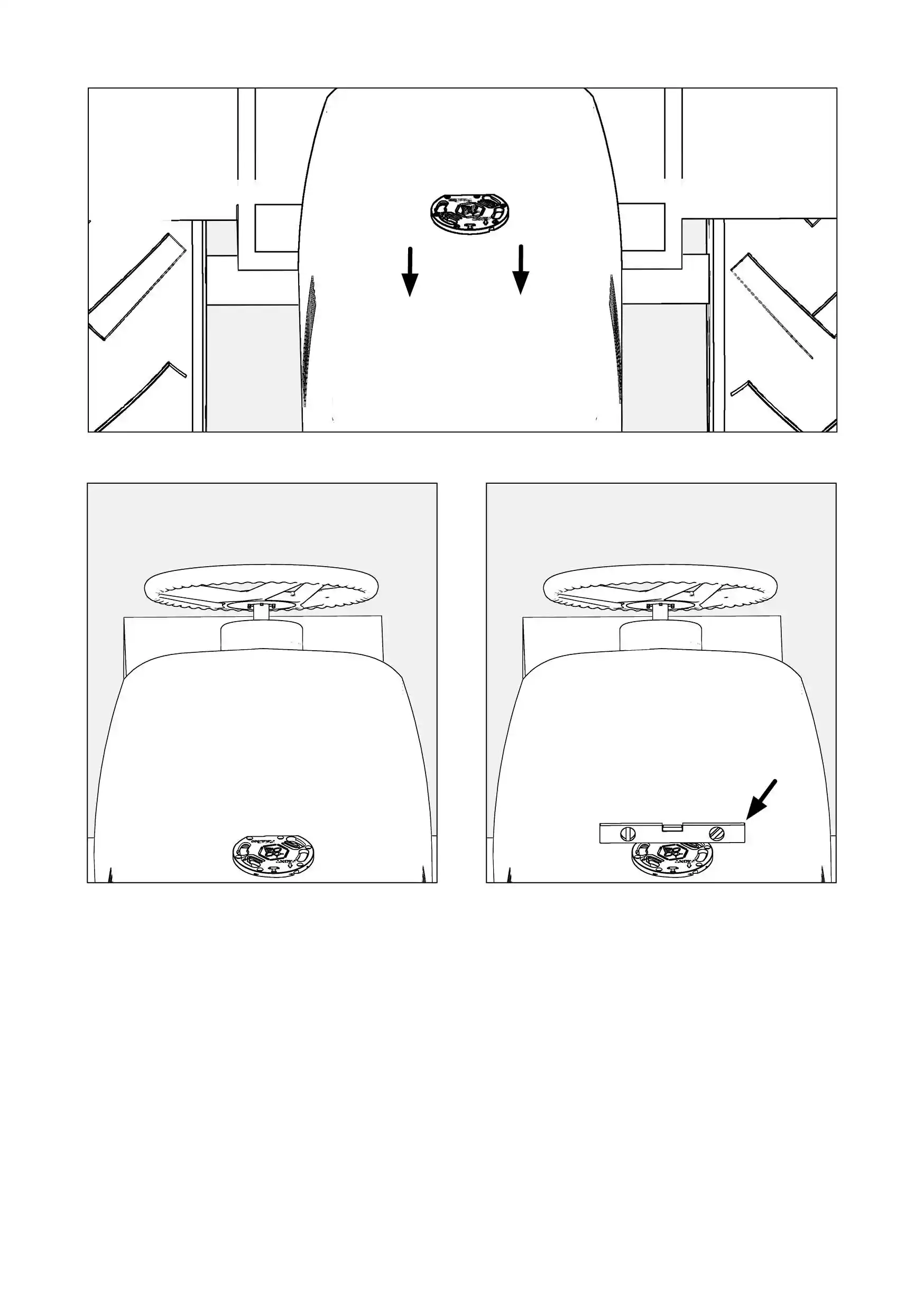
It is very important for the Steering Controller to be placed in the middle between the front wheels on the tractor bonnet to ensure the accuracy of the navigation. Required tools
How to do it?
|
You can horizontally scroll the table on mobile.
|
Mount the Plastic Plate on the bonnet
|
|
|
|
You can horizontally scroll the table on mobile. |
Install Steering Controller on the bonnet
In the package
How to do it?
|
You can horizontally scroll the table on mobile.
|
|
|
You can horizontally scroll the table on mobile. |

Mount the Plastic Plate on the roof
|
Important!
---
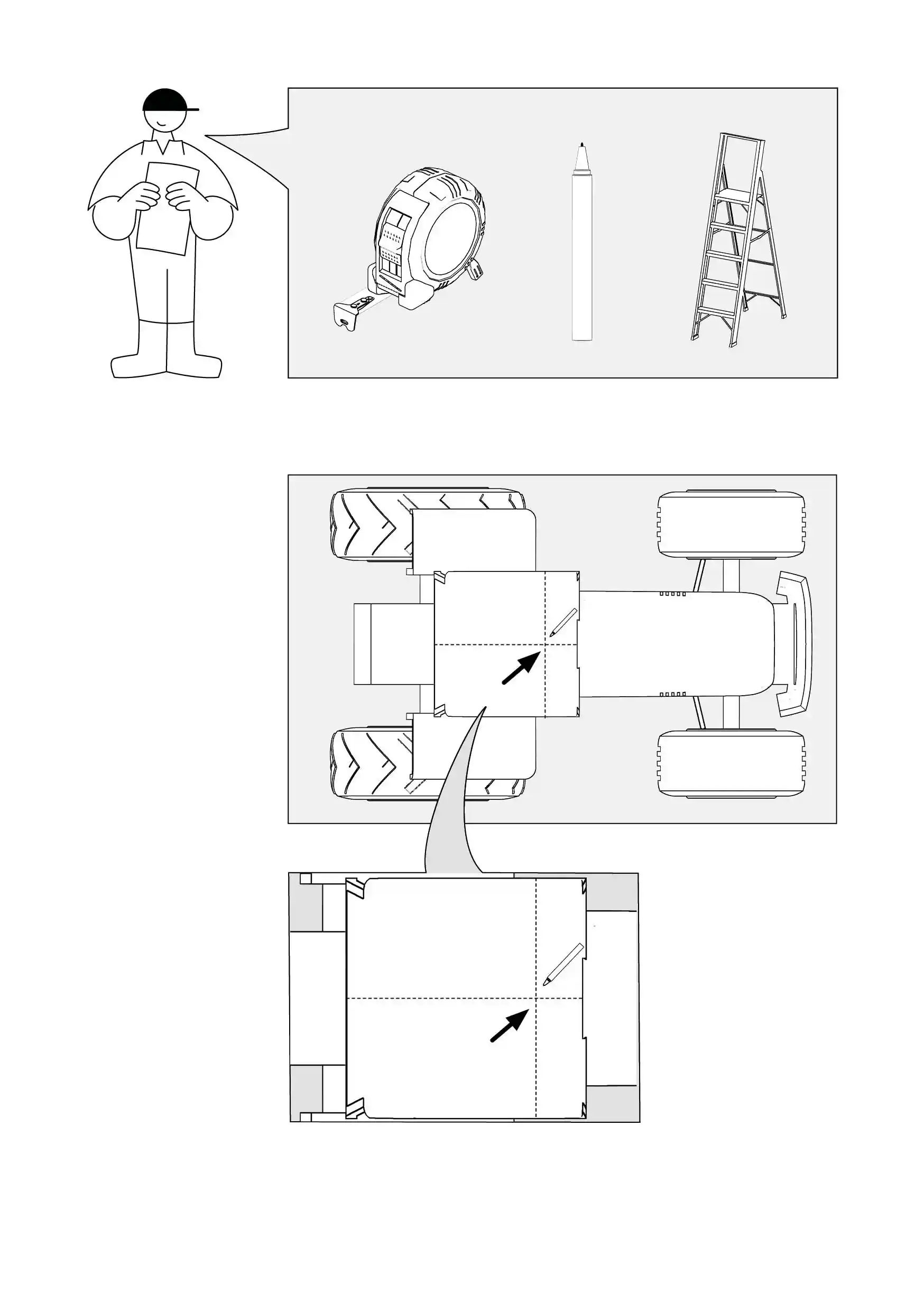
It is very important for the Steering Controller to be placed in the middle of the tractor roof to ensure the accuracy of the navigation. ---Required tools
How to do it?
|
You can horizontally scroll the table on mobile.
|
|
Important! ---Mount the plastic plate on the roof
|
|
|
|
You can horizontally scroll the table on mobile. |
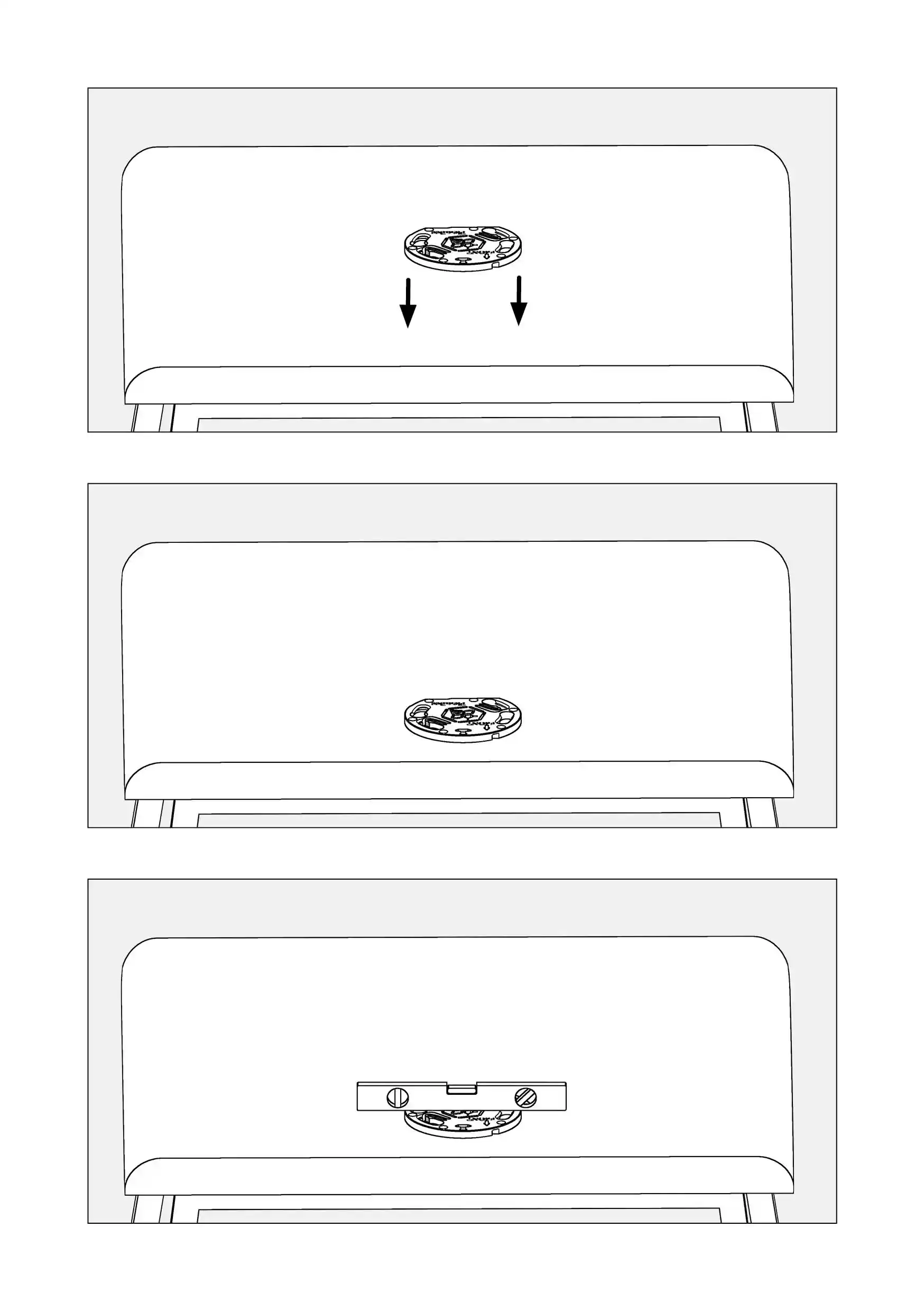
Install the Steering Controller on the Plastic Plate on the roof
In the package
How to do it?
|
You can horizontally scroll the table on mobile.
|
|
|
You can horizontally scroll the table on mobile. |

PowerTablet installation
Technical specification
Power Tablet
NFC (optional)
Sound
Interfaces
Power & Battery
Size & Weight
Environment
Docking Station
|
You can horizontally scroll the table on mobile.
|
|
|
You can horizontally scroll the table on mobile. |

Mount the Tablet Holder
|
Fix the holder ball to a metal plate. In the package
Required tools
How to mount it?
|
You can horizontally scroll the table on mobile.
|
|
|
You can horizontally scroll the table on mobile. |

Fix the handle to the handle ball
In the package
How to do it?
|
You can horizontally scroll the table on mobile.
|
|
|
You can horizontally scroll the table on mobile. |

Mount the PowerTablet Holder to the handle
In the package
Required items
How to do it?
|
You can horizontally scroll the table on mobile.
|
|
You can horizontally scroll the table on mobile. |

Fix the PowerTablet Holder to the handle
In the package
How to do it?
|
You can horizontally scroll the table on mobile.
|
|
|
You can horizontally scroll the table on mobile. |

Install SIM Card to PowerTablet
|
For the tablet to start operating correctly, you need to insert a SIM card with an active connection to the internet. You will need a nano SIM card. How to do it?
|
You can horizontally scroll the table on mobile.
|
|
|
You can horizontally scroll the table on mobile. |

Install Battery to PowerTablet
How to do it?
|
You can horizontally scroll the table on mobile.
|
|
|
You can horizontally scroll the table on mobile. |

Mount the PowerTablet in the Tablet Holder
How to do it?
|
You can horizontally scroll the table on mobile.
|
|
|
You can horizontally scroll the table on mobile. |

Base Station installation
Technical specification
The FieldBee L2 is GNSS RTK L1/L2 base station in a single rugged housing. It provides a reference position for RTK solutions up to 20 km distances over the internet and up to 2.5 km over the radio channel. It supports RTCM v3.3 correction protocol.
Benefits
GNSS
Precision
Mechanical
Power
Interfaces
In the package
|
You can horizontally scroll the table on mobile.
|
|
|
You can horizontally scroll the table on mobile. |

Install the Base Station
How to mount it?
Where to position it?
Requirements for a mounting place
Important
Do not’s
Signal strengthFieldBee Base Station transmits a correction signal to the Steering Controller over Wi-Fi or Radio (optional) with the following radiuses:
|
You can horizontally scroll the table on mobile.
|
|
|
You can horizontally scroll the table on mobile. |
Cable installation
Cable installation overview
|
Information
OverviewThe section explains how to connect each part of the FieldBee equipment with the Cable. It handles the connection of the Steering Controller. It also explains how to connect the PowerTablet and the Wi-Fi Router with the Cable. Finally, the power supply setting up is explained. |
You can horizontally scroll the table on mobile.
|
|
|
You can horizontally scroll the table on mobile. |

Connect with the Cable
|
Information
In the package
|
You can horizontally scroll the table on mobile.
|
|
|
You can horizontally scroll the table on mobile. |

Connect the Steering Controller with the Cable
How to connect it?
|
You can horizontally scroll the table on mobile.
|
|
|
You can horizontally scroll the table on mobile. |

Connect the Cable with the cigarette lighter socket
How to connect it?
|
You can horizontally scroll the table on mobile.
|
|
|
You can horizontally scroll the table on mobile. |

Connect the PowerTablet with the Cable
In the package
How to connect it?
|
You can horizontally scroll the table on mobile.
|
|
|
You can horizontally scroll the table on mobile. |

Turn on the power supply
Turn on the power supply
|
You can horizontally scroll the table on mobile.
|
|
|
You can horizontally scroll the table on mobile. |

Versions and updates
| Date | Version | Editor | Comments |
| 10.02.2025 | v4.10022025 | Nazar | Added pictures, added connection of switch button |
Datasheet
PowerGuide
|
|
Dimensions
Power
|
|
Environmental & Compliance
operating temperature -20°C ~ 85°C, RoHS, CE, ISO 15003
CommunicationJ1939 (CAN 2.0B) Wireless interfaces:
RestFul (configuration API) Socket NMEA 0183 |