# From EN to PL - EN PowerGuide installation manual

# Installation Overview


# Introduction

<div id="bkmrk-to-jest-lewa-cz%C4%99%C5%9B%C4%87-t" style="overflow-x: auto;"><table border="1" style="min-width: 568px; max-width: 1920px; height: auto; border-collapse: collapse; width: 100%; border: 1px solid rgb(241, 241, 241);" width="100% border: 1px #F1F1F1; table border="><tbody><tr style="height: auto;"><td style="width: 50.0618%; background-color: rgb(241, 241, 241); padding: 24px; border: 1px rgb(241, 241, 241); height: auto;">
##### FieldBee PowerSteer Manual Guidance

is an ultra-modern tractor guidance system created together with farmers. The RTK high-precision receiver and steering controller and FieldBee navigation app, developed specifically for agriculture, work together to make precision driving, field mapping, data collection and much more not only possible, but extremely easy and efficient.

  
The controller includes an L2 GNSS RTK receiver and a tilt/roll sensor in one durable, water- and dust-tight enclosure, while the navigation app works with all Android phones and tablets.

FieldBee PowerSteer Manual Guidance fits mosts tractors and can be seam- lessly transfered between machines thanks to short installation time and profile memory in the app.


</td><td style="width: 50.0618%; background-color: rgb(255, 255, 255); padding: 24px; height: auto; border-width: 1px; border-color: rgb(241, 241, 241);"><p class="callout info">You can horizontally scroll the table on mobile.</p>

[![PowerGuide_manual_26.10.webp](https://knowledge-base.fieldbee.com/uploads/images/gallery/2024-04/powerguide-manual-26-10.webp)](https://knowledge-base.fieldbee.com/uploads/images/gallery/2024-04/powerguide-manual-26-10.webp)

</td></tr><tr><td style="width: 50.0618%; background-color: rgb(241, 241, 241); padding: 24px; border: 1px rgb(241, 241, 241); height: auto;">#####   


</td><td style="width: 50.0618%; background-color: rgb(255, 255, 255); padding: 24px; height: auto; border-width: 1px; border-color: rgb(241, 241, 241);"><p class="callout info">You can horizontally scroll the table on mobile.</p>

</td></tr></tbody></table>

</div>

# Safety instructions

<div id="bkmrk-to-jest-lewa-cz%C4%99%C5%9B%C4%87-t" style="overflow-x: auto;"><table border="1" style="min-width: 568px; max-width: 1920px; height: auto; border-collapse: collapse; width: 100%; border: 1px solid rgb(241, 241, 241);" width="100% border: 1px #F1F1F1; table border="><tbody><tr style="height: auto;"><td style="width: 50.0618%; background-color: rgb(241, 241, 241); padding: 24px; border: 1px rgb(241, 241, 241); height: auto;">
##### Introductory remarks

To understand the potential hazards associated with the operation of the PowerSteer equipped vehicle, read carefully the provided documentation prior to installing or operating the Power Steer system on a vehicle. Please bear in mind that the safety instructions are for reference only and do not cover all possible hazardous and dangerous conditions.

  
FieldBee has made all possible efforts to ensure the reliability of the information contained in this instruction. However, errors and omissions may be possible. Therefore, the instruction is for reference only and does not constitute any express or implied warranty.

The FieldBee Power Steer system installer and manufacturer disclaim any responsibility for damage or physical harm caused by failure to adhere to the following safety requirements.

  
As the operator of the vehicle, you are responsible for its safe operation. The FieldBee Power Steer system is not designed to replace the vehicle’s operator.


</td><td style="width: 50.0618%; background-color: rgb(255, 255, 255); padding: 24px; height: auto; border-width: 1px; border-color: rgb(241, 241, 241);"><p class="callout info">You can horizontally scroll the table on mobile.</p>

[![PowerSteer_manual_25.10_eng5.webp](https://knowledge-base.fieldbee.com/uploads/images/gallery/2024-03/HZspowersteer-manual-25-10-eng5.webp)](https://knowledge-base.fieldbee.com/uploads/images/gallery/2024-03/HZspowersteer-manual-25-10-eng5.webp)

</td></tr><tr><td style="width: 50.0618%; background-color: rgb(241, 241, 241); padding: 24px; border: 1px rgb(241, 241, 241);"><p class="callout warning">**NOTE:**  
Prior to operating the PowerSteer Manual Guidance system, verify that all the screws, bolts, nuts, and cable connections are tight and that all the cables and hoses have been secured to prevent them from being damaged. Verify there are no oil leaks in the steering circuit.</p>

</td><td style="width: 50.0618%; background-color: rgb(255, 255, 255); padding: 24px; border-width: 1px; border-color: rgb(241, 241, 241);"> </td></tr><tr><td style="width: 50.0618%; background-color: rgb(241, 241, 241); padding: 24px; border: 1px rgb(241, 241, 241);">##### <span style="color: rgb(0, 0, 0); background-color: rgb(253, 229, 132);">**WARNING**</span>

The Autosteer system installer and manufacturer disclaim any responsibility for damage or physical

harm caused by failure to adhere to the following safety requirements:

As the operator of the vehicle, you are responsible for its safe operation. The Autosteer system is

not designed to replace the vehicle’s operator.

</td><td style="width: 50.0618%; background-color: rgb(255, 255, 255); padding: 24px; border-width: 1px; border-color: rgb(241, 241, 241);"> [![ikona02.webp](https://knowledge-base.fieldbee.com/uploads/images/gallery/2024-03/4q1ikona02.webp)](https://knowledge-base.fieldbee.com/uploads/images/gallery/2024-03/4q1ikona02.webp)

</td></tr><tr><td style="width: 50.0618%; background-color: rgb(241, 241, 241); padding: 24px; border: 1px rgb(241, 241, 241);">To understand the potential hazards associated with the operation <span class="s1">of an Autosteer equipped vehicle, read the provided documentation prior </span>to installing or operating the Autosteer system on a vehicle.

</td><td style="width: 50.0618%; background-color: rgb(255, 255, 255); padding: 24px; border-width: 1px; border-color: rgb(241, 241, 241);">[![ikona05.webp](https://knowledge-base.fieldbee.com/uploads/images/gallery/2024-03/ikona05.webp)](https://knowledge-base.fieldbee.com/uploads/images/gallery/2024-03/ikona05.webp)

</td></tr><tr><td style="width: 50.0618%; background-color: rgb(241, 241, 241); padding: 24px; border: 1px rgb(241, 241, 241);">To prevent accidental death or injury from being run over by the vehicle, never leave the vehicle’s operator seat with the Autosteer system engaged.

</td><td style="width: 50.0618%; background-color: rgb(255, 255, 255); padding: 24px; border-width: 1px; border-color: rgb(241, 241, 241);">[![ikona01.webp](https://knowledge-base.fieldbee.com/uploads/images/gallery/2024-03/DZ2ikona01.webp)](https://knowledge-base.fieldbee.com/uploads/images/gallery/2024-03/DZ2ikona01.webp)

</td></tr><tr><td style="width: 50.0618%; background-color: rgb(241, 241, 241); padding: 24px; border: 1px rgb(241, 241, 241);">To prevent accidental death or injury from being run over by the vehicle, verify that area around the vehicle is clear of people and obstacles before startup, calibration, tuning, or use of the Autosteer system.

</td><td style="width: 50.0618%; background-color: rgb(255, 255, 255); padding: 24px; border-width: 1px; border-color: rgb(241, 241, 241);"> [![ikona01.webp](https://knowledge-base.fieldbee.com/uploads/images/gallery/2024-03/ikona01.webp)](https://knowledge-base.fieldbee.com/uploads/images/gallery/2024-03/ikona01.webp)</td></tr><tr><td style="width: 50.0618%; background-color: rgb(241, 241, 241); padding: 24px; border: 1px rgb(241, 241, 241);">To prevent the accidental engagement of the Autosteer system and loss of vehicle control, power down the Autosteer system while driving <span class="s1">on roads. Never drive on roads or in public areas with the Autosteer </span>system powered up.

</td><td style="width: 50.0618%; background-color: rgb(255, 255, 255); padding: 24px; border-width: 1px; border-color: rgb(241, 241, 241);">[![ikona02.webp](https://knowledge-base.fieldbee.com/uploads/images/gallery/2024-03/4q1ikona02.webp)](https://knowledge-base.fieldbee.com/uploads/images/gallery/2024-03/4q1ikona02.webp)

</td></tr><tr><td style="width: 50.0618%; background-color: rgb(241, 241, 241); padding: 24px; border: 1px rgb(241, 241, 241);">Verify that you are in a stable position on the vehicle’s platform or stairs <span class="s1">when installing or removing the antenna assembly on top of the cab, </span>so you do not fall. If the vehicle does not provide a safe platform, use a ladder to safely access the vehicle’s roof.

</td><td style="width: 50.0618%; background-color: rgb(255, 255, 255); padding: 24px; border-width: 1px; border-color: rgb(241, 241, 241);">[![ikona03.webp](https://knowledge-base.fieldbee.com/uploads/images/gallery/2024-03/c14ikona03.webp)](https://knowledge-base.fieldbee.com/uploads/images/gallery/2024-03/c14ikona03.webp)

</td></tr><tr><td style="width: 50.0618%; background-color: rgb(241, 241, 241); padding: 24px; border: 1px rgb(241, 241, 241);">To avoid electrical shock hazards, remove the antennas from the vehicle <span class="s1">before driving under low structures or low electrical power lines.</span>

</td><td style="width: 50.0618%; background-color: rgb(255, 255, 255); padding: 24px; border-width: 1px; border-color: rgb(241, 241, 241);">[![ikona05.webp](https://knowledge-base.fieldbee.com/uploads/images/gallery/2024-03/Ix5ikona05.webp)](https://knowledge-base.fieldbee.com/uploads/images/gallery/2024-03/Ix5ikona05.webp)

</td></tr><tr><td style="width: 50.0618%; background-color: rgb(241, 241, 241); padding: 24px; border: 1px rgb(241, 241, 241);">If the installation requires working on the hydraulic system on the vehicle, <span class="s1">read and understand the hydraulic sections of the vehicle manufacturer’s </span>operators manual before starting the installation Wear hand and eye protection while performing hydraulic system maintenance. Relieve <span class="s2">hydraulic system pressure before servicing the hydraulic system.</span>

</td><td style="width: 50.0618%; background-color: rgb(255, 255, 255); padding: 24px; border-width: 1px; border-color: rgb(241, 241, 241);">[![ikona04.webp](https://knowledge-base.fieldbee.com/uploads/images/gallery/2024-03/ikona04.webp)](https://knowledge-base.fieldbee.com/uploads/images/gallery/2024-03/ikona04.webp)

</td></tr><tr><td style="width: 50.0618%; background-color: rgb(241, 241, 241); padding: 24px; border: 1px rgb(241, 241, 241);">##### <span style="color: rgb(0, 0, 0); background-color: rgb(253, 229, 132);">**CAUTION**</span>

The Autosteer system does not detect obstacles in the vehicle’s path. The vehicle operator must observe the path being driven and take over steering manually if an obstacle must be avoided.

</td><td style="width: 50.0618%; background-color: rgb(255, 255, 255); padding: 24px; border-width: 1px; border-color: rgb(241, 241, 241);">[![ikona02.webp](https://knowledge-base.fieldbee.com/uploads/images/gallery/2024-03/mpxikona02.webp)](https://knowledge-base.fieldbee.com/uploads/images/gallery/2024-03/mpxikona02.webp)

</td></tr><tr><td style="width: 50.0618%; background-color: rgb(241, 241, 241); padding: 24px; border: 1px rgb(241, 241, 241);">The Autosteer system does not control the speed of the vehicle. The operator must manually adjust the speed of the vehicle to keep the <span class="s1">vehicle safely under control.</span>

</td><td style="width: 50.0618%; background-color: rgb(255, 255, 255); padding: 24px; border-width: 1px; border-color: rgb(241, 241, 241);">[![ikona02.webp](https://knowledge-base.fieldbee.com/uploads/images/gallery/2024-03/4q1ikona02.webp)](https://knowledge-base.fieldbee.com/uploads/images/gallery/2024-03/4q1ikona02.webp)

</td></tr><tr><td style="width: 50.0618%; background-color: rgb(241, 241, 241); padding: 24px; border: 1px rgb(241, 241, 241);">The Autosteer system must be powered OFF when installing or removing the Autosteer, or any other components connected to the Autosteer system.

</td><td style="width: 50.0618%; background-color: rgb(255, 255, 255); padding: 24px; border-width: 1px; border-color: rgb(241, 241, 241);"> [![ikona02.webp](https://knowledge-base.fieldbee.com/uploads/images/gallery/2024-03/4q1ikona02.webp)](https://knowledge-base.fieldbee.com/uploads/images/gallery/2024-03/4q1ikona02.webp)</td></tr><tr><td style="width: 50.0618%; background-color: rgb(241, 241, 241); padding: 24px; border: 1px rgb(241, 241, 241);">##### <span style="color: rgb(0, 0, 0); background-color: rgb(253, 229, 132);">**Installation Safety Measures**</span>

The Power Steer system must be powered OFF when installing or removing the Power Steer, or any other components connected to the Power Steer system.

</td><td style="width: 50.0618%; background-color: rgb(255, 255, 255); padding: 24px; border-width: 1px; border-color: rgb(241, 241, 241);">[![Frame 820.webp](https://knowledge-base.fieldbee.com/uploads/images/gallery/2024-04/frame-820.webp)](https://knowledge-base.fieldbee.com/uploads/images/gallery/2024-04/frame-820.webp)

</td></tr><tr><td style="width: 50.0618%; background-color: rgb(241, 241, 241); padding: 24px; border: 1px rgb(241, 241, 241);">Verify that you are in a stable position when installing or removing the Steering Controller on the roof so you do not fall down. If the vehicle does not provide a safe platform, use a ladder to safely access the vehicle’s roof.

</td><td style="width: 50.0618%; background-color: rgb(255, 255, 255); padding: 24px; border-width: 1px; border-color: rgb(241, 241, 241);">[![Frame 819.webp](https://knowledge-base.fieldbee.com/uploads/images/gallery/2024-04/frame-819.webp)](https://knowledge-base.fieldbee.com/uploads/images/gallery/2024-04/frame-819.webp)

</td></tr><tr><td style="width: 50.0618%; background-color: rgb(241, 241, 241); padding: 24px; border: 1px rgb(241, 241, 241);">To prevent accidental death or injury from being run over by the <span class="s1">vehicle, verify that area around the vehicle is clear of people </span><span class="s1">and obstacles before installation, calibration, tuning, or use of </span><span class="s1">the PowerSteer system.</span>

</td><td style="width: 50.0618%; background-color: rgb(255, 255, 255); padding: 24px; border-width: 1px; border-color: rgb(241, 241, 241);">[![Frame 816.webp](https://knowledge-base.fieldbee.com/uploads/images/gallery/2024-04/frame-816.webp)](https://knowledge-base.fieldbee.com/uploads/images/gallery/2024-04/frame-816.webp)

</td></tr><tr><td style="width: 50.0618%; background-color: rgb(241, 241, 241); padding: 24px; border: 1px rgb(241, 241, 241);">Keep the equipment away from high-power wireless equipment such as wireless transmitters, radar transmitters, high frequency <span class="s1">and current devices, and microwaves.</span>

</td><td style="width: 50.0618%; background-color: rgb(255, 255, 255); padding: 24px; border-width: 1px; border-color: rgb(241, 241, 241);">[![Frame 817.webp](https://knowledge-base.fieldbee.com/uploads/images/gallery/2024-04/frame-817.webp)](https://knowledge-base.fieldbee.com/uploads/images/gallery/2024-04/frame-817.webp)

</td></tr><tr><td style="width: 50.0618%; background-color: rgb(241, 241, 241); padding: 24px; border: 1px rgb(241, 241, 241);">Do not install the product in an environment with high tempera<span class="s1">ture, heavy dust, harmful gas, flammable substances, explosive </span><span class="s1">substances, electromagnetic interference (large radar station, </span><span class="s1">transmitter station, substation), unstable voltage, high vibra</span><span class="s1">tion, or loud noise; otherwise, the equipment may be unable to </span><span class="s1">operate normally.</span>

</td><td style="width: 50.0618%; background-color: rgb(255, 255, 255); padding: 24px; border-width: 1px; border-color: rgb(241, 241, 241);">[![Frame 818.webp](https://knowledge-base.fieldbee.com/uploads/images/gallery/2024-04/frame-818.webp)](https://knowledge-base.fieldbee.com/uploads/images/gallery/2024-04/frame-818.webp)

</td></tr><tr><td style="width: 50.0618%; background-color: rgb(241, 241, 241); padding: 24px; border: 1px rgb(241, 241, 241);">Do not install the equipment in places vulnerable to water accumulation, water seepage, water dripping, condensation, etc., so as to prevent the equipment from being damaged by water accumulated at the interface.

</td><td style="width: 50.0618%; background-color: rgb(255, 255, 255); padding: 24px; border-width: 1px; border-color: rgb(241, 241, 241);">[![Frame 821.webp](https://knowledge-base.fieldbee.com/uploads/images/gallery/2024-04/frame-821.webp)](https://knowledge-base.fieldbee.com/uploads/images/gallery/2024-04/frame-821.webp)

</td></tr><tr><td style="width: 50.0618%; background-color: rgb(241, 241, 241); padding: 24px; border: 1px rgb(241, 241, 241);">If the equipment is operated in an environment with high relative humidity, insulation materials may be degraded to cause <span class="s1">electric leakage; the mechanical properties of materials may </span>be changed and metal parts may become rusty.

</td><td style="width: 50.0618%; background-color: rgb(255, 255, 255); padding: 24px; border-width: 1px; border-color: rgb(241, 241, 241);">[![Frame 822.webp](https://knowledge-base.fieldbee.com/uploads/images/gallery/2024-04/frame-822.webp)](https://knowledge-base.fieldbee.com/uploads/images/gallery/2024-04/frame-822.webp)

</td></tr><tr><td style="width: 50.0618%; background-color: rgb(241, 241, 241); padding: 24px; border: 1px rgb(241, 241, 241);">After the equipment has been installed, do not remove it frequently as this may lead to unexpected damage.

</td><td style="width: 50.0618%; background-color: rgb(255, 255, 255); padding: 24px; border-width: 1px; border-color: rgb(241, 241, 241);">[![Frame 823.webp](https://knowledge-base.fieldbee.com/uploads/images/gallery/2024-04/frame-823.webp)](https://knowledge-base.fieldbee.com/uploads/images/gallery/2024-04/frame-823.webp)

</td></tr><tr><td style="width: 50.0618%; background-color: rgb(241, 241, 241); padding: 24px; border: 1px rgb(241, 241, 241);">When connecting the power cable to the battery, connect the terminals of the power line to the positive and negative terminals of the battery accordingly.

</td><td style="width: 50.0618%; background-color: rgb(255, 255, 255); padding: 24px; border-width: 1px; border-color: rgb(241, 241, 241);">[![Frame 824.webp](https://knowledge-base.fieldbee.com/uploads/images/gallery/2024-04/frame-824.webp)](https://knowledge-base.fieldbee.com/uploads/images/gallery/2024-04/frame-824.webp)

</td></tr><tr><td style="width: 50.0618%; background-color: rgb(241, 241, 241); padding: 24px; border: 1px rgb(241, 241, 241);">##### <span style="color: rgb(0, 0, 0); background-color: rgb(253, 229, 132);">**Operation Safety**</span>

To prevent accidental death or injury from being run over by the vehicle, never leave the vehicle’s operator seat with the Power Steer system engaged.

  
To prevent the accidental engagement of the Power Wheel system and loss of vehicle control, power OFF the Power Steer system while driving on roads. Never drive on roads or in public areas with the Power Steer system powered up.

  
The Power Steer system does not detect obstacles in the vehicle’s path. The vehicle operator must observe the path being driven and take over steering manually if an obstacle must be avoided.

The Power Steer system does not control the speed of the vehicle. The operator must manually adjust the speed of the vehicle to keep the vehicle safely under control.

</td><td style="width: 50.0618%; background-color: rgb(255, 255, 255); padding: 24px; border-width: 1px; border-color: rgb(241, 241, 241);"> [![ikona02.webp](https://knowledge-base.fieldbee.com/uploads/images/gallery/2024-03/4q1ikona02.webp)](https://knowledge-base.fieldbee.com/uploads/images/gallery/2024-03/4q1ikona02.webp)</td></tr><tr><td style="width: 50.0618%; background-color: rgb(241, 241, 241); padding: 24px; border: 1px rgb(241, 241, 241); height: auto;">#####   


</td><td style="width: 50.0618%; background-color: rgb(255, 255, 255); padding: 24px; height: auto; border-width: 1px; border-color: rgb(241, 241, 241);"><p class="callout info">You can horizontally scroll the table on mobile.</p>

</td></tr></tbody></table>

</div>

# Support

<div id="bkmrk-to-jest-lewa-cz%C4%99%C5%9B%C4%87-t" style="overflow-x: auto;"><table border="1" style="min-width: 568px; max-width: 1920px; height: auto; border-collapse: collapse; width: 100%; border: 1px solid rgb(241, 241, 241);" width="100% border: 1px #F1F1F1; table border="><tbody><tr style="height: auto;"><td style="width: 50.0618%; background-color: rgb(241, 241, 241); padding: 24px; border: 1px rgb(241, 241, 241); height: auto;">
##### Support  


The FieldBee Team is happy to help farmers with any questions they may have about FieldBee products.

Our specialists provide free online service from **Monday to Friday** from **9:00 to 18:00 CET.**

**Feel free to contact us via:**

- WhatsApp chat +380 50 224 8722
- support@fieldbee.com

Please kindly attach materials related to the questions (such as photos, screen-shots, or videos). This will speed up the process of providing support assistance.


</td><td style="width: 50.0618%; background-color: rgb(255, 255, 255); padding: 24px; height: auto; border-width: 1px; border-color: rgb(241, 241, 241);"><p class="callout info">You can horizontally scroll the table on mobile.</p>

[![PowerSteer_manual_25.10_eng5.webp](https://knowledge-base.fieldbee.com/uploads/images/gallery/2024-03/powersteer-manual-25-10-eng5.webp)](https://knowledge-base.fieldbee.com/uploads/images/gallery/2024-03/powersteer-manual-25-10-eng5.webp)

</td></tr><tr><td style="width: 50.0618%; background-color: rgb(241, 241, 241); padding: 24px; border: 1px rgb(241, 241, 241); height: auto;">#####   


</td><td style="width: 50.0618%; background-color: rgb(255, 255, 255); padding: 24px; height: auto; border-width: 1px; border-color: rgb(241, 241, 241);"><p class="callout info">You can horizontally scroll the table on mobile.</p>

</td></tr></tbody></table>

</div>

# Inside the Box

<div id="bkmrk-to-jest-lewa-cz%C4%99%C5%9B%C4%87-t" style="overflow-x: auto;"><table border="1" style="min-width: 568px; max-width: 1920px; height: auto; border-collapse: collapse; width: 100%; border: 1px solid rgb(241, 241, 241);" width="100% border: 1px #F1F1F1; table border="><tbody><tr style="height: auto;"><td style="width: 50.0618%; background-color: rgb(241, 241, 241); padding: 24px; border: 1px rgb(241, 241, 241); height: auto;"><p class="callout warning">**Information**  
Check whether the package you have received contains the following items.</p>

##### PowerSteer Controller (1)  


an Integrated RTK receiver and steering controller is a high-precision electronic controller that provides automatic steering capability to the vehicle.

##### Controller Mounting Plate (2)  


a plastic stand that allows easy fixation of the Steering Controler on a tractor.

##### Cable (3)  


a dedicated set of cables and plugs that connects the various parts of the equipment, responsible for energy transmission.

- Superseal Plug
- PowerSteer Controller Plug
- Cigarette Lighter Plug


</td><td style="width: 50.0618%; background-color: rgb(255, 255, 255); padding: 24px; height: auto; border-width: 1px; border-color: rgb(241, 241, 241);"><p class="callout info">You can horizontally scroll the table on mobile.</p>

[![PowerGuide_manual_26.1015.webp](https://knowledge-base.fieldbee.com/uploads/images/gallery/2024-04/powerguide-manual-26-1015.webp)](https://knowledge-base.fieldbee.com/uploads/images/gallery/2024-04/powerguide-manual-26-1015.webp)

</td></tr><tr><td style="width: 50.0618%; background-color: rgb(241, 241, 241); padding: 24px; border: 1px rgb(241, 241, 241); height: auto;">#####   


</td><td style="width: 50.0618%; background-color: rgb(255, 255, 255); padding: 24px; height: auto; border-width: 1px; border-color: rgb(241, 241, 241);"><p class="callout info">You can horizontally scroll the table on mobile.</p>

</td></tr></tbody></table>

</div>

# Optional equipment

<div id="bkmrk-to-jest-lewa-cz%C4%99%C5%9B%C4%87-t" style="overflow-x: auto;"><table border="1" style="min-width: 568px; max-width: 1920px; height: auto; border-collapse: collapse; width: 100%; border: 1px solid rgb(241, 241, 241);" width="100% border: 1px #F1F1F1; table border="><tbody><tr style="height: auto;"><td style="width: 50.0618%; background-color: rgb(241, 241, 241); padding: 24px; border: 1px rgb(241, 241, 241); height: auto;"><p class="callout warning">You get these items if you ordered them as an additon to the basic equipment.</p>


##### PowerTablet (1)  


- a tablet with a resistant display and a solid case that absorbs shakes.

##### PowerTablet holder (2)  


- a holder designed to offer the stability of hold and flexibility of mounting.

##### RTK Base Station (3)  


- a smart sensor that transmits RTK correction with a radius of 2 km via radio and 10 km via the internet, providing +/- 2 cm accuracy in the field.


</td><td style="width: 50.0618%; background-color: rgb(255, 255, 255); padding: 24px; height: auto; border-width: 1px; border-color: rgb(241, 241, 241);"><p class="callout info">You can horizontally scroll the table on mobile.</p>

[![PowerGuide_manual_26.1017.webp](https://knowledge-base.fieldbee.com/uploads/images/gallery/2024-04/powerguide-manual-26-1017.webp)](https://knowledge-base.fieldbee.com/uploads/images/gallery/2024-04/powerguide-manual-26-1017.webp)

</td></tr><tr><td style="width: 50.0618%; background-color: rgb(241, 241, 241); padding: 24px; border: 1px rgb(241, 241, 241); height: auto;">#####   


</td><td style="width: 50.0618%; background-color: rgb(255, 255, 255); padding: 24px; height: auto; border-width: 1px; border-color: rgb(241, 241, 241);"><p class="callout info">You can horizontally scroll the table on mobile.</p>

</td></tr></tbody></table>

</div>

# Pre-requisites for installation

<div id="bkmrk-to-jest-lewa-cz%C4%99%C5%9B%C4%87-t" style="overflow-x: auto;"><table border="1" style="min-width: 568px; max-width: 1920px; height: auto; border-collapse: collapse; width: 100%; border: 1px solid rgb(241, 241, 241);" width="100% border: 1px #F1F1F1; table border="><tbody><tr style="height: auto;"><td style="width: 50.0618%; background-color: rgb(241, 241, 241); padding: 24px; border: 1px rgb(241, 241, 241); height: auto;"><p class="callout warning">You get these items if you ordered them as an additon to the basic equipment.</p>


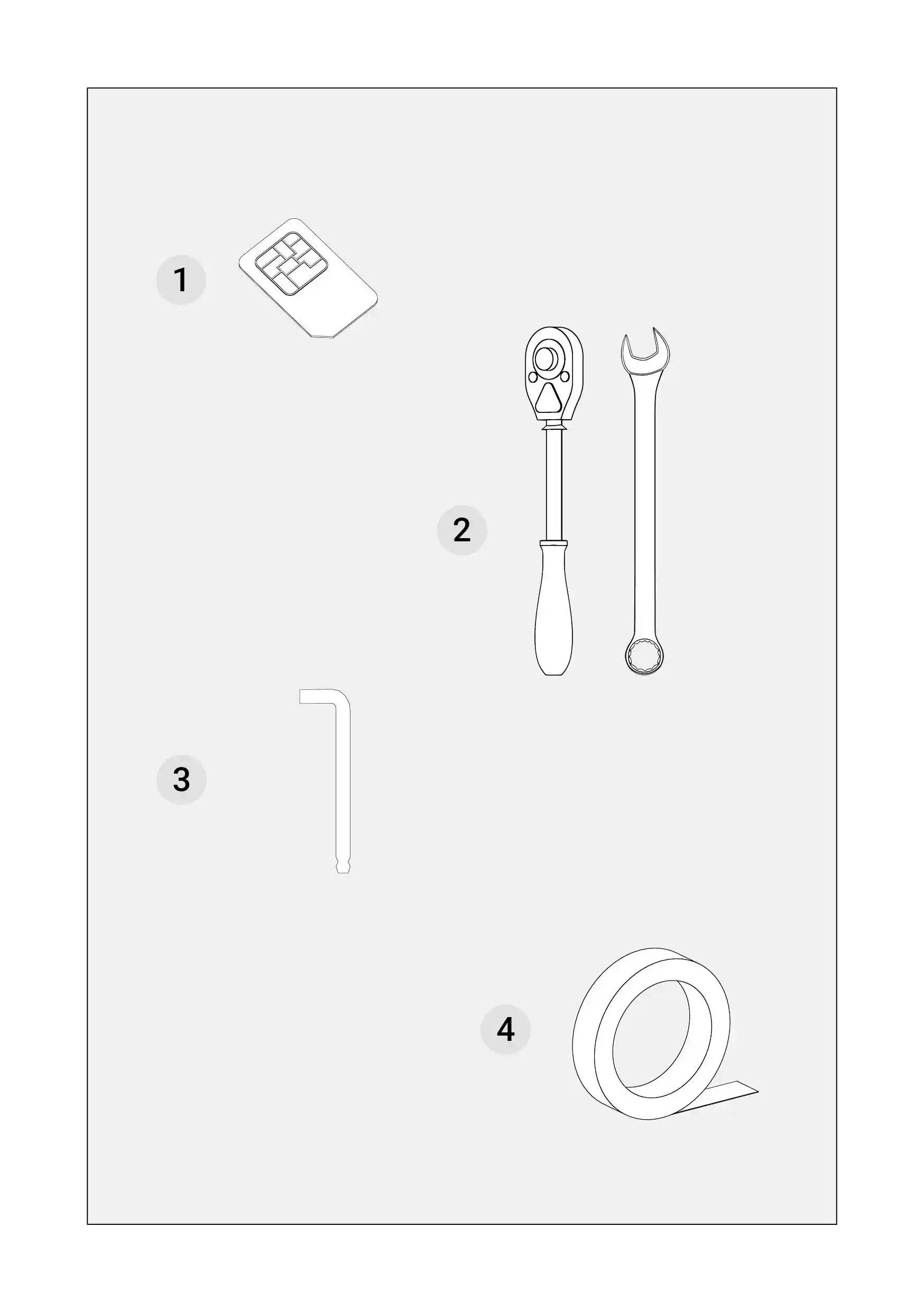
##### SIM Card (1)  


- a nano SIM Card with an active connection to the internet. (The SIM Card for the tablet is not needed if you use your smartphone as a hot-spot).

##### Socket Wrench (2)  


- a tool consisting of two parts: a handle (the ratchet) and an end piece connection (the socket). When you spin the handle clockwise, it will tighten the fastener, and when you rotate it counterclockwise, it will turn freely without tightening. Required sizes:
- Size 13
- Size 17

##### Hex Key (3)  


- a small handheld tool that is used for driving bolts and screws with a hexagonal socket. Required sizes:
- Size 8

##### Double-sided tape (4)  


- a tape that is coated with adhesive on both sides.

##### Cross Tip Screwdriver (5)  


- has two slots, oriented perpendicular to each other, in the fastener head.

##### A measuring tape (6)  


- a device that allows measuring the distance between two objects.

##### A level (7)  


- a tool that allows to appoint the verticality and horizontality of a surface.

##### A ladder (8)  


- a tool that makes it easier to access the tractor’s roof.


</td><td style="width: 50.0618%; background-color: rgb(255, 255, 255); padding: 24px; height: auto; border-width: 1px; border-color: rgb(241, 241, 241);"><p class="callout info">You can horizontally scroll the table on mobile.</p>

[![PowerSteer_manual_25.10_eng29.webp](https://knowledge-base.fieldbee.com/uploads/images/gallery/2024-03/powersteer-manual-25-10-eng29.webp)](https://knowledge-base.fieldbee.com/uploads/images/gallery/2024-03/powersteer-manual-25-10-eng29.webp)

[![PowerGuide_manual_26.1021.webp](https://knowledge-base.fieldbee.com/uploads/images/gallery/2024-04/powerguide-manual-26-1021.webp)](https://knowledge-base.fieldbee.com/uploads/images/gallery/2024-04/powerguide-manual-26-1021.webp)

</td></tr><tr><td style="width: 50.0618%; background-color: rgb(241, 241, 241); padding: 24px; border: 1px rgb(241, 241, 241); height: auto;">#####   


</td><td style="width: 50.0618%; background-color: rgb(255, 255, 255); padding: 24px; height: auto; border-width: 1px; border-color: rgb(241, 241, 241);"><p class="callout info">You can horizontally scroll the table on mobile.</p>

</td></tr></tbody></table>

</div>

# Overview of the installation steps

<div id="bkmrk-to-jest-lewa-cz%C4%99%C5%9B%C4%87-t" style="overflow-x: auto;"><table border="1" style="min-width: 568px; max-width: 1920px; height: auto; border-collapse: collapse; width: 100%; border: 1px solid rgb(241, 241, 241);" width="100% border: 1px #F1F1F1; table border="><tbody><tr style="height: auto;"><td style="width: 50.0618%; background-color: rgb(241, 241, 241); padding: 24px; border: 1px rgb(241, 241, 241); height: auto;">This Installation Overview chapter contains a general description of each step of the installation process. The Installation manual has been designed to make the installation process easy and effortless. Each chapter of the manual comprises written instructions and visual illustrations.

The written instructions have been divided into the description of the equipment from the box and the required items necessary to successfully complete each step. Following that there is information on how to dismount, mount and connect specific equipment parts accordingly. Some steps have been provided  
with tips that will make the process even more straightforward.

  
The visual illustrations have been created to give you an overview of the visual look of the provided equipment and the required items. They also provide a visual presentation of the tasks you need to complete to install the FieldBee system successfully.

**Define the Steering Controller position** - you are advised on the most suitable way to locate the best position for the Steering Controller.

**Install the Plastic Plate** - this step illustrates how to mount the plastic plate that works as the base for the Steering Controller. There are instructions in this manual for installation on the roof and the vehicle’s bonnet.

**Connect with the Cable** - you are provided with the instructions on connecting the equipment together. It contains information on the cables, plugs, and sockets of all the equipment parts. There are instructions on connecting all the equipment to an sure an electricity supply to all its parts.

**Mount the Tablet Holder** - in this step, you have instructions on assembling the parts of the tablet holder in the cabin and fixing it where it is comfortable to operate the tablet.

**Connect the Tablet with the Cable** - the step contains instructions on safely connecting the Tablet with the Cable.

**Measure the vehicle** - the last step describes how to make measurements of the wheelbase, rear axle, Steering Controller height, and offsets so that they can be inserted into the FieldBee Navigation Application.


</td><td style="width: 50.0618%; background-color: rgb(255, 255, 255); padding: 24px; height: auto; border-width: 1px; border-color: rgb(241, 241, 241);"><p class="callout info">You can horizontally scroll the table on mobile.</p>

[![PowerGuide_manual_256.105.webp](https://knowledge-base.fieldbee.com/uploads/images/gallery/2024-04/powerguide-manual-256-105.webp)](https://knowledge-base.fieldbee.com/uploads/images/gallery/2024-04/powerguide-manual-256-105.webp)

</td></tr><tr><td style="width: 50.0618%; background-color: rgb(241, 241, 241); padding: 24px; border: 1px rgb(241, 241, 241); height: auto;">#####   


</td><td style="width: 50.0618%; background-color: rgb(255, 255, 255); padding: 24px; height: auto; border-width: 1px; border-color: rgb(241, 241, 241);"><p class="callout info">You can horizontally scroll the table on mobile.</p>

</td></tr></tbody></table>

</div>

# Steering Controller Installation


# Technical specification

<div id="bkmrk-to-jest-lewa-cz%C4%99%C5%9B%C4%87-t" style="overflow-x: auto;"><table border="1" style="min-width: 568px; max-width: 1920px; height: auto; border-collapse: collapse; width: 100%; border: 1px solid rgb(241, 241, 241);" width="100% border: 1px #F1F1F1; table border="><tbody><tr style="height: auto;"><td style="width: 50.0618%; background-color: rgb(241, 241, 241); padding: 24px; border: 1px rgb(241, 241, 241); height: auto;">
##### Accuracy and operating speed

- 2,5cm accuracy with RTK correction signal.
- Minimum and maximum speed: 0.8-22 km/h
- Tilt compensation in range +/-15 deg, accuracy 1 deg

#####  GNSS Receiver  


- GPS L1C/A L2C, GLO L1OF L2OF, GAL E1B/CE5b, BDS B1I B2I, QZSS L1C/A L2C
- RTK 0.01m + 1 ppm CEP
- Multi-band RTK with fast convergence times and reliable performance

##### Communication 

- Wireless interfaces:  
    \- LoRa 865/915 MHz
    
    \- WiFi
- 1xISO11898-1 compatible port (internal communication)
- RestFul,
- Socket NMEA 0183,
- CANopen


##### Dimensions

- Steering Controller Ø151mm x 75mm
- Steering wheel actuator Ø171mm x 65mm
- Steering wheel Ø400mm x 50mm

##### Power

- Supply Voltage 9-32V DC
- Consumption up to 10-15A (during steering)
- PowerWheel rated torque 7 N\*m
- PowerWheel maximum torque 15 N\*m
- Rated motor speed 100 rpm

##### Environmental &amp; Compliance

- PowerWheel – IP-55, operating temperature: -25°C to 55°C
- Steering Controller – IP-67, operating temperature:-20°C to 85°C RoHS, CE, ISO 15003
- Tablet – IP-65, when used with supplied dock

##### Vehicle Compatibility

- Fits front-wheel steer tractors
- Rear wheel steer combine harvesters and self-propelled forage harvesters
- Self-propelled sprayers with front-wheel steers only
- Can be used in open-cabin tractors


</td><td style="width: 50.0618%; background-color: rgb(255, 255, 255); padding: 24px; height: auto; border-width: 1px; border-color: rgb(241, 241, 241);"><p class="callout info">You can horizontally scroll the table on mobile.</p>

[![PowerSteer_manual_25.10_eng81.webp](https://knowledge-base.fieldbee.com/uploads/images/gallery/2024-03/powersteer-manual-25-10-eng81.webp)](https://knowledge-base.fieldbee.com/uploads/images/gallery/2024-03/powersteer-manual-25-10-eng81.webp)

##   


</td></tr><tr><td style="width: 50.0618%; background-color: rgb(241, 241, 241); padding: 24px; border: 1px rgb(241, 241, 241); height: auto;">#####   


</td><td style="width: 50.0618%; background-color: rgb(255, 255, 255); padding: 24px; height: auto; border-width: 1px; border-color: rgb(241, 241, 241);"><p class="callout info">You can horizontally scroll the table on mobile.</p>

</td></tr></tbody></table>

</div>

# Define the Steering Controller position

<div id="bkmrk-to-jest-lewa-cz%C4%99%C5%9B%C4%87-t" style="overflow-x: auto;"><table border="1" style="min-width: 568px; max-width: 1920px; height: auto; border-collapse: collapse; width: 100%; border: 1px solid rgb(241, 241, 241);" width="100% border: 1px #F1F1F1; table border="><tbody><tr style="height: auto;"><td style="width: 50.0618%; background-color: rgb(241, 241, 241); padding: 24px; border: 1px rgb(241, 241, 241); height: auto;"><p class="callout info">**Information**  
There are two places where you can mount the Steering Controller. It can either be on the front bonnet of the tractor or on the roof of the tractor.</p>

\---

<p class="callout warning">**Important!**   
It's crucial to maintain a minimum distance of 80 cm between the center of the controller and the center of the rear axle when installing it on the roof.</p>


</td><td style="width: 50.0618%; background-color: rgb(255, 255, 255); padding: 24px; height: auto; border-width: 1px; border-color: rgb(241, 241, 241);"><p class="callout info">You can horizontally scroll the table on mobile.</p>

[![PowerSteer_manual_25.10_eng81.webp](https://knowledge-base.fieldbee.com/uploads/images/gallery/2024-03/IHHpowersteer-manual-25-10-eng81.webp)](https://knowledge-base.fieldbee.com/uploads/images/gallery/2024-03/IHHpowersteer-manual-25-10-eng81.webp)

##   


</td></tr><tr><td style="width: 50.0618%; background-color: rgb(241, 241, 241); padding: 24px; border: 1px rgb(241, 241, 241); height: auto;">#####   


</td><td style="width: 50.0618%; background-color: rgb(255, 255, 255); padding: 24px; height: auto; border-width: 1px; border-color: rgb(241, 241, 241);"><p class="callout info">You can horizontally scroll the table on mobile.</p>

</td></tr></tbody></table>

</div>

# Prepare the plastic plate

<div id="bkmrk-to-jest-lewa-cz%C4%99%C5%9B%C4%87-t" style="overflow-x: auto;"><table border="1" style="min-width: 568px; max-width: 1920px; height: auto; border-collapse: collapse; width: 100%; border: 1px solid rgb(241, 241, 241);" width="100% border: 1px #F1F1F1; table border="><tbody><tr style="height: auto;"><td style="width: 50.0618%; background-color: rgb(241, 241, 241); padding: 24px; border: 1px rgb(241, 241, 241); height: auto;"><p class="callout warning">Warning: It is very important for the Plastic Plate to be mounted on an ideally flat position for the navigation system operate accurately. </p>

#####  

##### In the package:

- The Plastic Plate

##### Required tools  


- Double-side tape
- A level
- A degreaser
- A wiper

##### Prepare the plastic plate

1. Grab the Plastic Plate and locate the bottom side. The top is marked with the sign “Front”.
2. Place the Plastic Plate on a flat position with the bottom side facing up.
3. Spray the degreaser on the bottom of the Plastic Plate and wipe it until the surface is dry.
4. Cut 6-8 two centimeter long pieces of tape.
5. Remove the covers from one side of the 6-8 pieces of tape.
6. Stick the tape with the uncovered side to the rounded edges of the Plastic Plate ensuring that the space between the pieces of tape is no larger than 2 centimeters.


</td><td style="width: 50.0618%; background-color: rgb(255, 255, 255); padding: 24px; height: auto; border-width: 1px; border-color: rgb(241, 241, 241);"><p class="callout info">You can horizontally scroll the table on mobile.</p>

[![PowerSteer_manual_25.10_eng85.webp](https://knowledge-base.fieldbee.com/uploads/images/gallery/2024-03/powersteer-manual-25-10-eng85.webp)](https://knowledge-base.fieldbee.com/uploads/images/gallery/2024-03/powersteer-manual-25-10-eng85.webp)

##   


</td></tr><tr><td style="width: 50.0618%; background-color: rgb(241, 241, 241); padding: 24px; border: 1px rgb(241, 241, 241); height: auto;">#####   


</td><td style="width: 50.0618%; background-color: rgb(255, 255, 255); padding: 24px; height: auto; border-width: 1px; border-color: rgb(241, 241, 241);"><p class="callout info">You can horizontally scroll the table on mobile.</p>

</td></tr></tbody></table>

</div>

# Mount the plastic plate on the bonnet

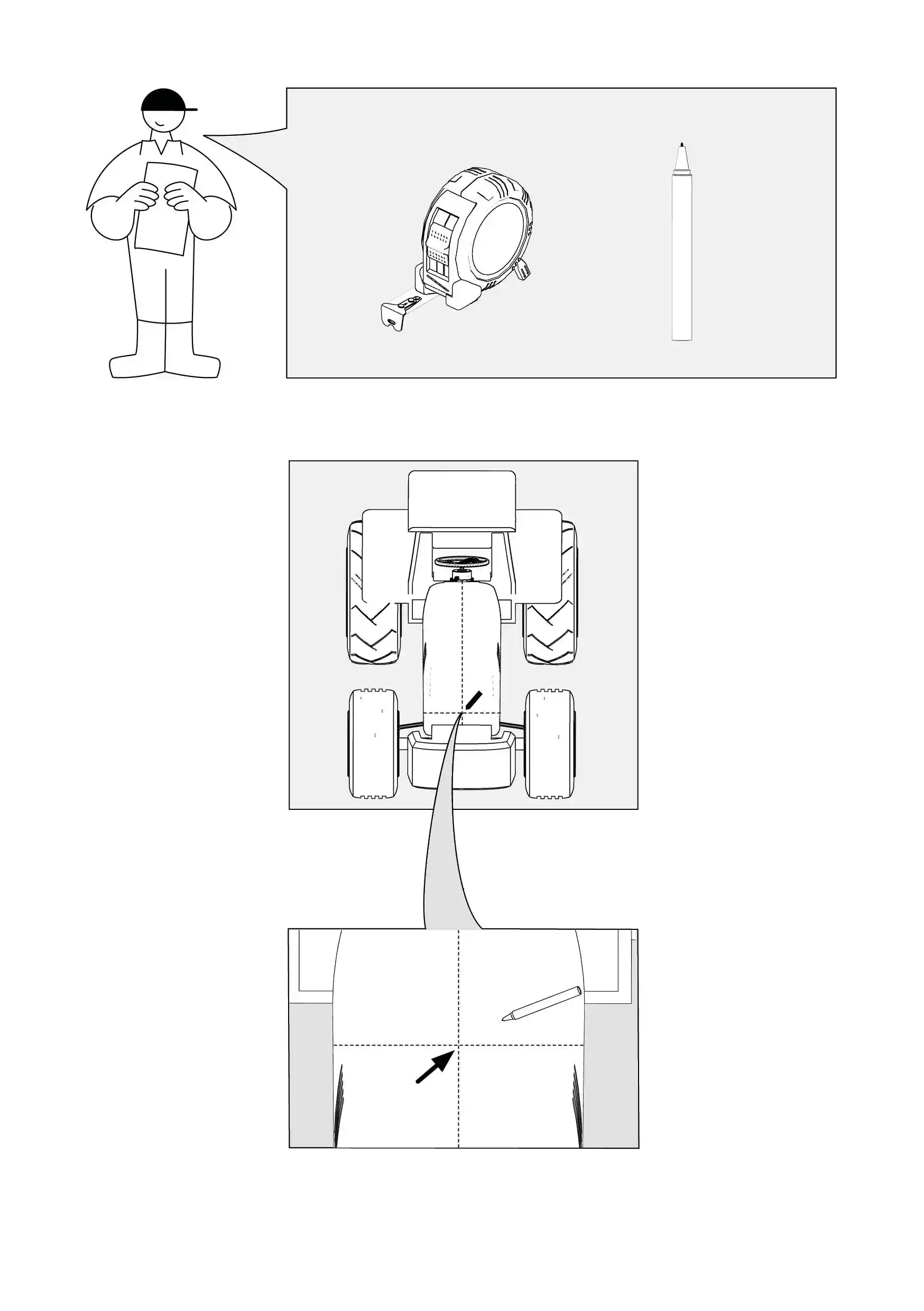
<div id="bkmrk-to-jest-lewa-cz%C4%99%C5%9B%C4%87-t" style="overflow-x: auto;"><table border="1" style="min-width: 568px; max-width: 1920px; height: auto; border-collapse: collapse; width: 100%; border: 1px solid rgb(241, 241, 241);" width="100% border: 1px #F1F1F1; table border="><tbody><tr style="height: auto;"><td style="width: 50.0618%; background-color: rgb(241, 241, 241); padding: 24px; border: 1px rgb(241, 241, 241); height: auto;"><p class="callout warning">It is very important for the Steering Controller to be placed in the middle between the front wheels on the tractor bonnet to ensure the accuracy of the navigation.</p>

##### Required tools  


- Tape-measure
- Marker pen

##### How to do it?

1. Check the width of the tractor bonnet between the center of the front wheels.
2. Use a marker pen to mark a spot in the center of the front wheels.
3. In this way, you can find the most suitable position for the Steering Controller.


</td><td style="width: 50.0618%; background-color: rgb(255, 255, 255); padding: 24px; height: auto; border-width: 1px; border-color: rgb(241, 241, 241);"><p class="callout info">You can horizontally scroll the table on mobile.</p>

[![PowerSteer_manual_25.10_eng83.webp](https://knowledge-base.fieldbee.com/uploads/images/gallery/2024-03/powersteer-manual-25-10-eng83.webp)](https://knowledge-base.fieldbee.com/uploads/images/gallery/2024-03/powersteer-manual-25-10-eng83.webp)

</td></tr><tr><td style="width: 50.0618%; background-color: rgb(241, 241, 241); padding: 24px; border: 1px rgb(241, 241, 241);">##### Mount the plastic plate on the bonnet  


1. Spray the degreaser on the bonnet in the area surrounding the mark and wipe it until the surface is dry.
2. Check with a level whether the position that you have marked on the bonnet is ideally flat.
3. If the bonnet has any uplift in the center or any other anomaly in its flatness, use the double-sided tape to level the space up.
4. Cut 5-8 centimeters long pieces of tape, uncover one side of the tape and stick it to the bonnet.
5. Repeat the above steps as many times as necessary, each time checking with the level whether the position is ideally flat.
6. Grab the Plastic Plate and turn it around so that the side with the tape is facing the bottom.
7. Try the Plastic Plate on the bonnet, ensuring that it is located with the Front side mark towards the direction of the tractor.
8. Firmly press the Plastic Plate to the bonnet.
9. Lightly hit the Plastic Plate with your feast on the edges to ensure that it sticks firmly to the bonnet.

</td><td style="width: 50.0618%; background-color: rgb(255, 255, 255); padding: 24px; border-width: 1px; border-color: rgb(241, 241, 241);">[![PowerSteer_manual_25.10_eng87.webp](https://knowledge-base.fieldbee.com/uploads/images/gallery/2024-03/iTFpowersteer-manual-25-10-eng87.webp)](https://knowledge-base.fieldbee.com/uploads/images/gallery/2024-03/iTFpowersteer-manual-25-10-eng87.webp)

</td></tr><tr><td style="width: 50.0618%; background-color: rgb(241, 241, 241); padding: 24px; border: 1px rgb(241, 241, 241); height: auto;">#####   


</td><td style="width: 50.0618%; background-color: rgb(255, 255, 255); padding: 24px; height: auto; border-width: 1px; border-color: rgb(241, 241, 241);"><p class="callout info">You can horizontally scroll the table on mobile.</p>

</td></tr></tbody></table>

</div>

# Install steering controller on the bonnet

<div id="bkmrk-to-jest-lewa-cz%C4%99%C5%9B%C4%87-t" style="overflow-x: auto;"><table border="1" style="min-width: 568px; max-width: 1920px; height: auto; border-collapse: collapse; width: 100%; border: 1px solid rgb(241, 241, 241);" width="100% border: 1px #F1F1F1; table border="><tbody><tr style="height: auto;"><td style="width: 50.0618%; background-color: rgb(241, 241, 241); padding: 24px; border: 1px rgb(241, 241, 241); height: auto;">
##### In the package

- Steering Controller

##### How to do it?

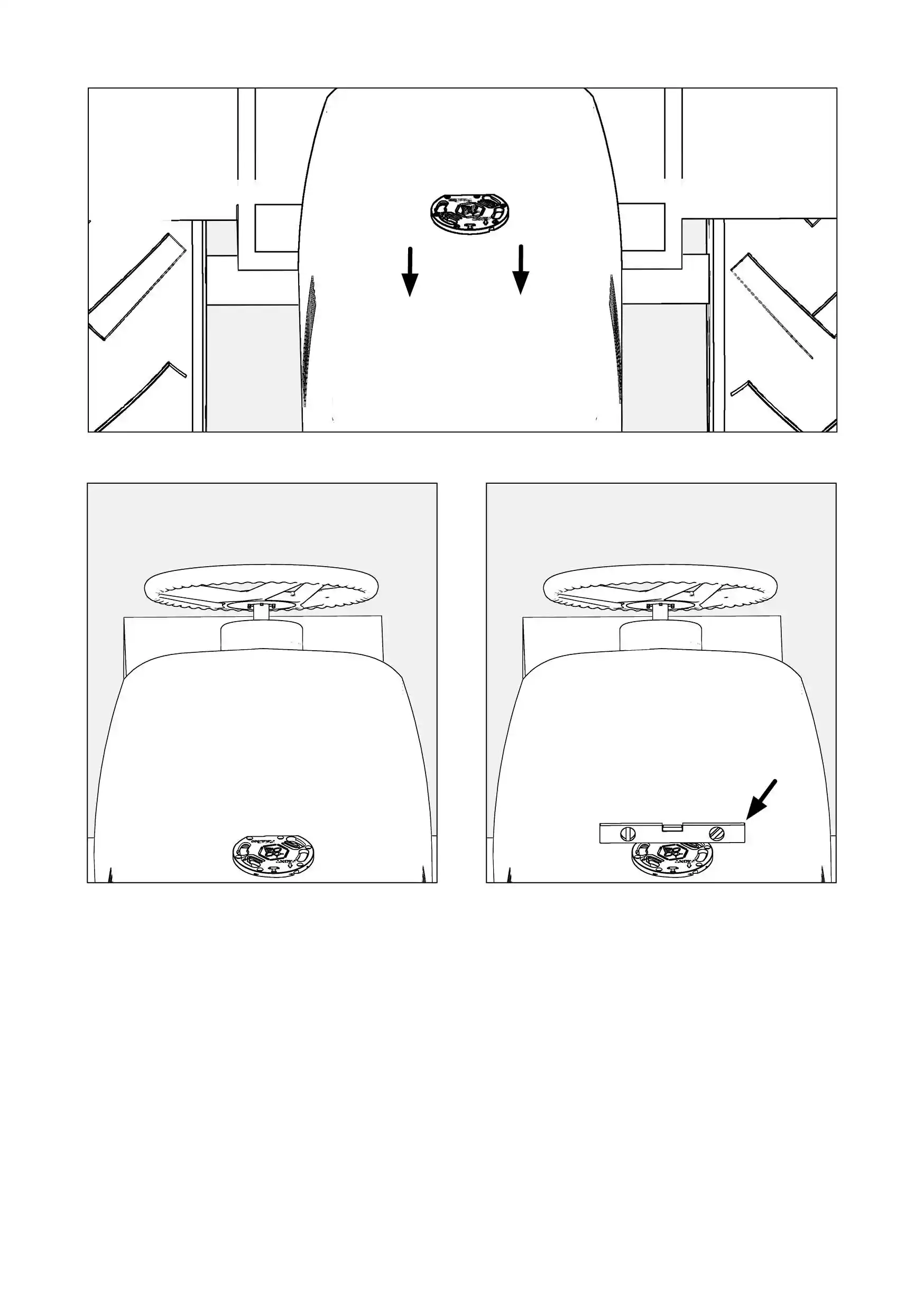
1. Grab the Steering Controller and hover it over the Plastic Plate, making sure that the power plug is positioned on the side of the cabin.
2. Delicately lower the Steering Controller down on the Plastic Plate.
3. Move the Steering Controller leftwards until the Steering Controller hops in to the Plastic Plate.
4. Turn the Steering Controller rightwards until you feel high resistance from the Plastic Plate.


</td><td style="width: 50.0618%; background-color: rgb(255, 255, 255); padding: 24px; height: auto; border-width: 1px; border-color: rgb(241, 241, 241);"><p class="callout info">You can horizontally scroll the table on mobile.</p>

[![PowerSteer_manual_25.10_eng89.webp](https://knowledge-base.fieldbee.com/uploads/images/gallery/2024-03/powersteer-manual-25-10-eng89.webp)](https://knowledge-base.fieldbee.com/uploads/images/gallery/2024-03/powersteer-manual-25-10-eng89.webp)

##   


</td></tr><tr><td style="width: 50.0618%; background-color: rgb(241, 241, 241); padding: 24px; border: 1px rgb(241, 241, 241); height: auto;">#####   


</td><td style="width: 50.0618%; background-color: rgb(255, 255, 255); padding: 24px; height: auto; border-width: 1px; border-color: rgb(241, 241, 241);"><p class="callout info">You can horizontally scroll the table on mobile.</p>

</td></tr></tbody></table>

</div>

# Mount the plastic plate on the roof

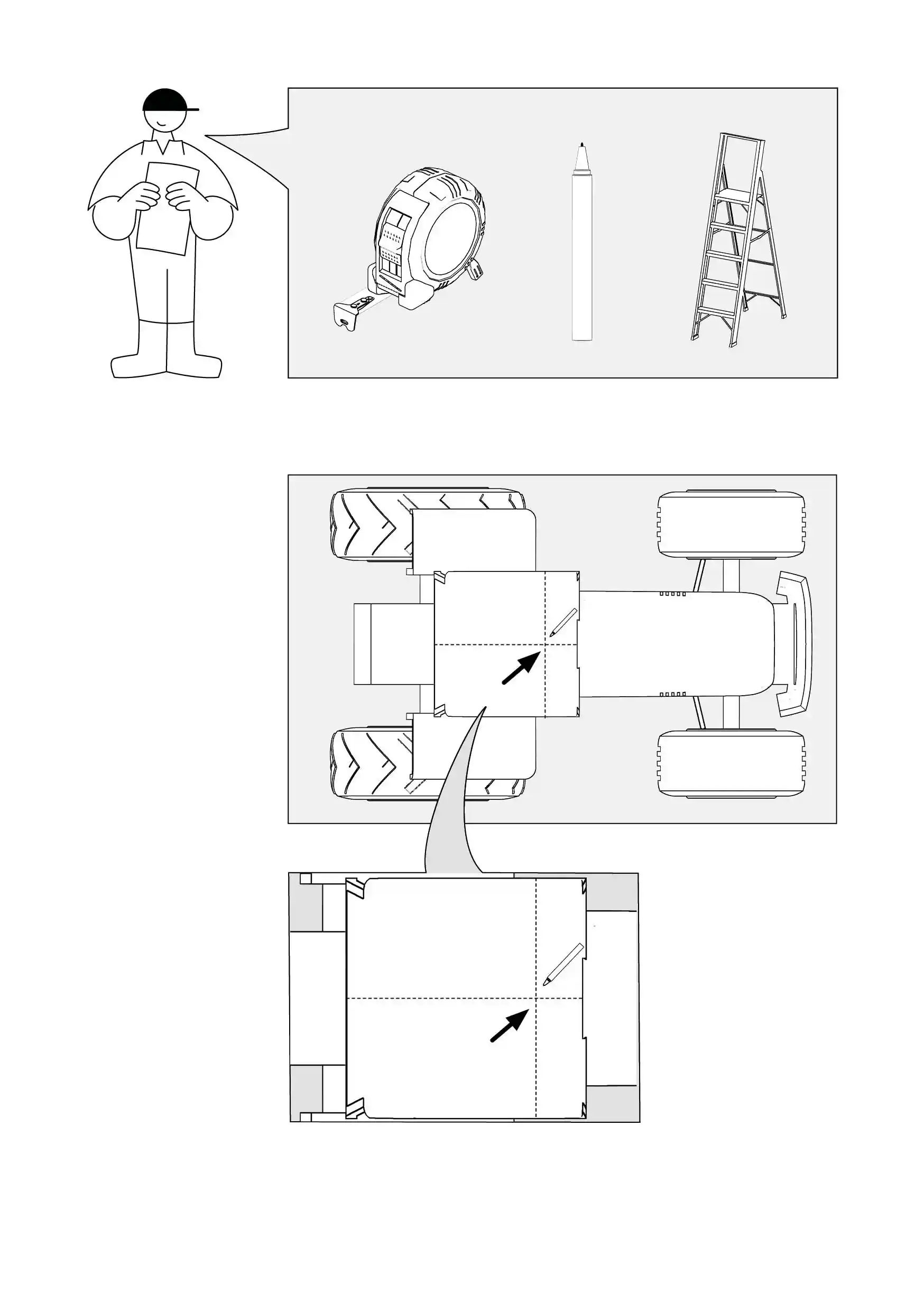
<div id="bkmrk-to-jest-lewa-cz%C4%99%C5%9B%C4%87-t" style="overflow-x: auto;"><table border="1" style="min-width: 568px; max-width: 1920px; height: auto; border-collapse: collapse; width: 100%; border: 1px solid rgb(241, 241, 241);" width="100% border: 1px #F1F1F1; table border="><tbody><tr style="height: auto;"><td style="width: 50.0618%; background-color: rgb(241, 241, 241); padding: 24px; border: 1px rgb(241, 241, 241); height: auto;"><p class="callout warning">**Important!**   
It's crucial to maintain a minimum distance of 80 cm between the center of the controller and the center of the rear axle when installing it on the roof.</p>

\---

<p class="callout warning">It is very important for the Steering Controller to be placed in the middle of the tractor roof to ensure the accuracy of the navigation.</p>

##### ---

##### Required tools  


- Tape-measure
- Marker pen
- A ladder

##### How to do it?

1. Take a ladder and position it next to the tractor  
    so that you can easily access the roof.
2. Check the length of the tractor roof using a tape measure.
3. Use a marker pen to mark a spot in the middle of the length of the roof.
4. Check the width of the tractor roof in a place where you marked a spot.
5. Use a marker pen to mark a spot in the middle of the width of the roof.
6. This way, you can find the most suitable  
    position for the Steering Controller.


</td><td style="width: 50.0618%; background-color: rgb(255, 255, 255); padding: 24px; height: auto; border-width: 1px; border-color: rgb(241, 241, 241);"><p class="callout info">You can horizontally scroll the table on mobile.</p>

[![PowerSteer_manual_25.10_eng91.webp](https://knowledge-base.fieldbee.com/uploads/images/gallery/2024-03/powersteer-manual-25-10-eng91.webp)](https://knowledge-base.fieldbee.com/uploads/images/gallery/2024-03/powersteer-manual-25-10-eng91.webp)

</td></tr><tr><td style="width: 50.0618%; background-color: rgb(241, 241, 241); padding: 24px; border: 1px rgb(241, 241, 241);"><p class="callout warning">**Important!**   
It's crucial to maintain a minimum distance of 80 cm between the center of the controller and the center of the rear axle when installing it on the roof.</p>

##### ---

##### Mount the plastic plate on the roof  


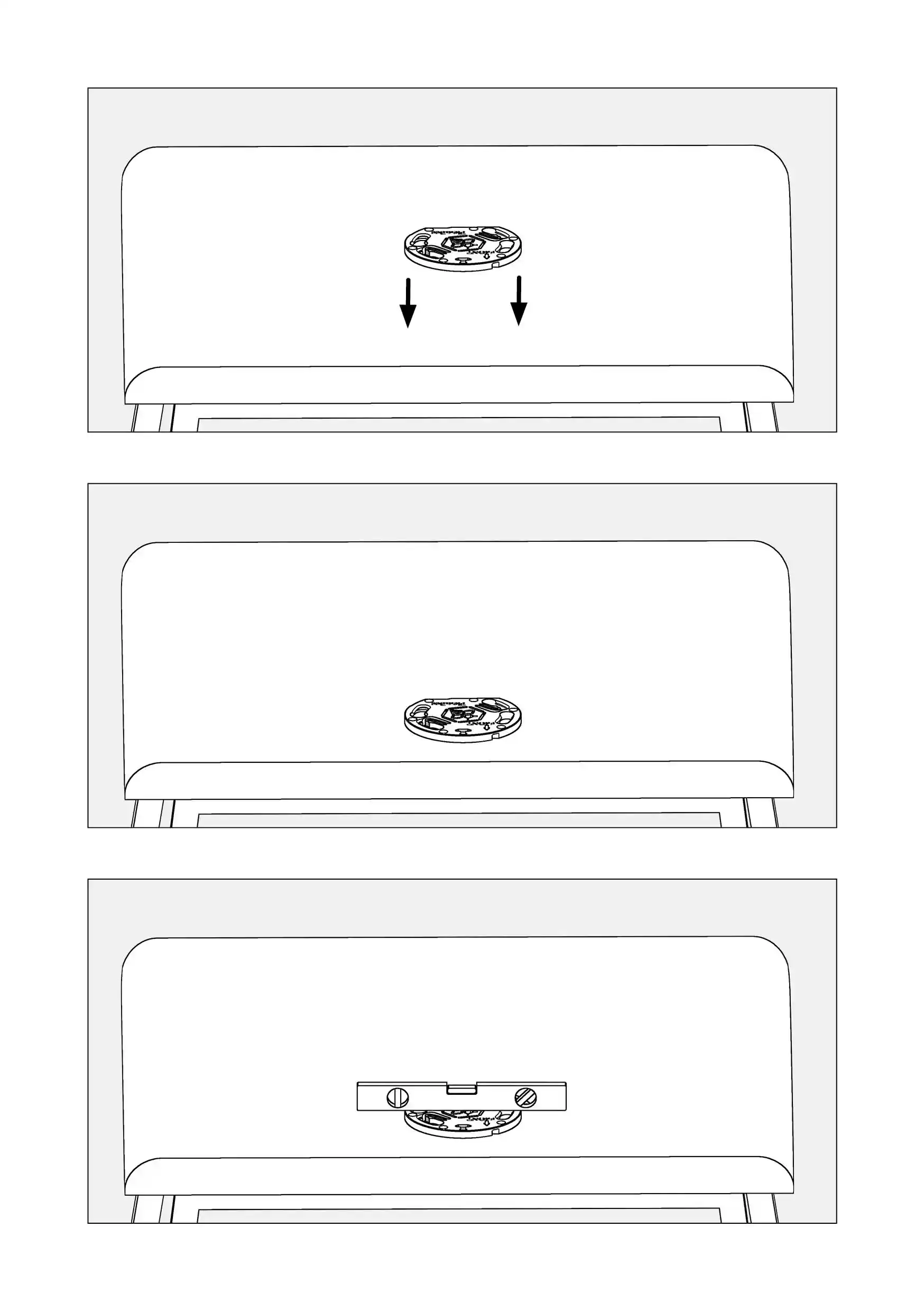
1. Take a ladder and position it next to the tractor so you can easily access the roof.
2. Spray the degreaser on the roof in the area surrounding the mark and wipe it until the surface is dry.
3. Check with a level whether the position you have market on the roof is ideally flat.
4. Cut 6-8 centimeters long pieces of tape, uncover one side of the tape and stick it to the roof so that the shape of the sticked tape is rectangular.
5. If the roof has any uplifts in the centre or any other anomaly in its flatness, use the double-side tape to level the space up.
6. Stick the double-side tape in the places where there is any anomaly in flatness.
7. Repeat the above step as many times as necessary, each time checking with the level whether the position is ideally flat.
8. Take the Plastic Plate and turn it around so that the side with the tape faces the bottom.
9. Try the Plastic Plate on the roof, ensuring that the element standing out from the circular shape ideally faces the back of the tractor.
10. Firmly press the Plastic Plate to the roof.
11. Lightly hit the Plastic Plate with your feast on the edges to ensure that it sticks firmly to the roof.

</td><td style="width: 50.0618%; background-color: rgb(255, 255, 255); padding: 24px; border-width: 1px; border-color: rgb(241, 241, 241);">[![PowerSteer_manual_25.10_eng95.webp](https://knowledge-base.fieldbee.com/uploads/images/gallery/2024-03/powersteer-manual-25-10-eng95.webp)](https://knowledge-base.fieldbee.com/uploads/images/gallery/2024-03/powersteer-manual-25-10-eng95.webp)

</td></tr><tr><td style="width: 50.0618%; background-color: rgb(241, 241, 241); padding: 24px; border: 1px rgb(241, 241, 241); height: auto;">#####   


</td><td style="width: 50.0618%; background-color: rgb(255, 255, 255); padding: 24px; height: auto; border-width: 1px; border-color: rgb(241, 241, 241);"><p class="callout info">You can horizontally scroll the table on mobile.</p>

</td></tr></tbody></table>

</div>

# Install the steering controller on the Plastic Plate on the roof

<div id="bkmrk-to-jest-lewa-cz%C4%99%C5%9B%C4%87-t" style="overflow-x: auto;"><table border="1" style="min-width: 568px; max-width: 1920px; height: auto; border-collapse: collapse; width: 100%; border: 1px solid rgb(241, 241, 241);" width="100% border: 1px #F1F1F1; table border="><tbody><tr style="height: auto;"><td style="width: 50.0618%; background-color: rgb(241, 241, 241); padding: 24px; border: 1px rgb(241, 241, 241); height: auto;">
##### In the package

- Steering Controller

##### How to do it?

1. Take the Steering Controller and hover it over the Plastic Plate, making sure that the power plug is positioned at the back of the tractor.
2. Delicately lower the Steering Controller down on the Plastic Plate.
3. Move the Steering Controller leftwards until the Steering Controller hops into the Plastic Plate.
4. Turn the Steering Controller rightwards until you feel high resistance from the Plastic Plate.


</td><td style="width: 50.0618%; background-color: rgb(255, 255, 255); padding: 24px; height: auto; border-width: 1px; border-color: rgb(241, 241, 241);"><p class="callout info">You can horizontally scroll the table on mobile.</p>

[![image.png](https://knowledge-base.fieldbee.com/uploads/images/gallery/2025-02/scaled-1680-/meyimage.png)](https://knowledge-base.fieldbee.com/uploads/images/gallery/2025-02/meyimage.png)

##   


</td></tr><tr><td style="width: 50.0618%; background-color: rgb(241, 241, 241); padding: 24px; border: 1px rgb(241, 241, 241); height: auto;">#####   


</td><td style="width: 50.0618%; background-color: rgb(255, 255, 255); padding: 24px; height: auto; border-width: 1px; border-color: rgb(241, 241, 241);"><p class="callout info">You can horizontally scroll the table on mobile.</p>

</td></tr></tbody></table>

</div>

# PowerTablet installation


# Technical specification

<div id="bkmrk-to-jest-lewa-cz%C4%99%C5%9B%C4%87-t" style="overflow-x: auto;"><table border="1" style="min-width: 568px; max-width: 1920px; height: auto; border-collapse: collapse; width: 100%; border: 1px solid rgb(241, 241, 241);" width="100% border: 1px #F1F1F1; table border="><tbody><tr style="height: auto;"><td style="width: 50.0618%; background-color: rgb(241, 241, 241); padding: 24px; border: 1px rgb(241, 241, 241); height: auto;">
##### Power Tablet

- CPU - Qualcomm Cortex-A53 64-bit Octa-core Processor, 1.8GHz
- GPU - Adreno 506
- Operating System - Android 9.0
- RAM - 2 GB LPDD3 (Default) / 4GB (Optional)
- Storage - 16 GB eMMC (Default) / 64 GB (Optional)
- Storage Expansion - Micro SD 128 GB
- LCD - 10 inch HD (1280 x 800), 1000cd/m2
    
    high brightness, sunlight readable
- Touchscreen - Multi touch capacitive touchscreen supporting glove and rain mode
- Camera (optional) - Front: 5 MP, Rear: 16 MP with LED light
- Bluetooth - 4.2 BLE
- WLAN - IEEE 802.11 a/b/g/n/ac. 2.4GHz/5GHz
- Mobile Broadband - LTE, HSPA+, UMTS, EDGE,
    
    GPRS, GSM (Data and Voice)
- GNSS - GPS/GLONASS

##### NFC (optional)

- Read / Write Mode: ISO / IEC 14443 A&amp;B up to
    
    848 kbit/s, FeliCa at 212 &amp; 424 kbit/s
- MIFARE 1K, 4K, NFC Forum type 1, 2, 3, 4, 5 tags, ISO/IEC 15693 All peer-to-peer modes
- Card Emulation Mode (from host): NFC Forum T3T (ISO/IEC 14443 A&amp;B) at 106 kbit/s

##### Sound

- Built-in speaker 2W, 85 dB
- Internal microphones

##### Interfaces 

- Type-C, Compliant with USB 3.0 (For data transfer, support OTG)
- Docking connector x1 (Pogo pin x24)
- Headset jack
- 1D/2D scanner (optional) - All major 1- barcodes, PDF417, QR code M1/M2/Micro and Data matrix etc
- Fingerprint Reader (optional) - Capacitive, Area sensor
- Sensors - Acceleration sensors, Ambient light sensor, Gyroscope, Compass

##### Power &amp; Battery

- DC8-36V (ISO 7637-ill compliant)
- Battery: 3.7V, 8000mAh Li-ion (Repleacable)
- Battery operating time: about 4.5 hours (Typical)
- Battery charging time: about 4.5 hours

##### Size &amp; Weight

- Physical Dimensions - 277 x 185 x 31.6 mm
- Weight - 1357 g (2.99 lb)

##### Environment

- Gravity drop resistance test: 120 cm
- Vibration test: MIL-STD-810G
- Dust resistance test: IP6x
- Water resistance test: IPx7
- Operating temperature: -10℃ ~ 65℃ (14℉ ~ 149℉) / 0℃ ~ 55℃ (32 ℉ ~ 131℉) (charging)
- Storage temperature: -20℃ ~ 70℃ (-4℉ ~ 158℉)

##### Docking Station

- USB2.0 (Type-A) - x1
- RS232 - x2
- Docking Station Status - x1
- ACC - x 1
- Power - x1
- Canbus
- CAN 2.0b (optional)
- J1939 (optional)
- OBD-II (optional)
- GPIO (Positive Trigger input)
- Input x2, Output x2 (Default)
- GPIO x6 (optional)
- Analog Inputs - 3x (optional)
- 1-wire (optional)
- RJ45 (optional)
- RS485 (optional)
- RS422 (optional)
- Video in (optional)


</td><td style="width: 50.0618%; background-color: rgb(255, 255, 255); padding: 24px; height: auto; border-width: 1px; border-color: rgb(241, 241, 241);"><p class="callout info">You can horizontally scroll the table on mobile.</p>

[![image.png](https://knowledge-base.fieldbee.com/uploads/images/gallery/2025-02/scaled-1680-/bozimage.png)](https://knowledge-base.fieldbee.com/uploads/images/gallery/2025-02/bozimage.png)

</td></tr><tr><td style="width: 50.0618%; background-color: rgb(241, 241, 241); padding: 24px; border: 1px rgb(241, 241, 241); height: auto;">#####   


</td><td style="width: 50.0618%; background-color: rgb(255, 255, 255); padding: 24px; height: auto; border-width: 1px; border-color: rgb(241, 241, 241);"><p class="callout info">You can horizontally scroll the table on mobile.</p>

</td></tr></tbody></table>

</div>

# Mount the Tablet Holder

<div id="bkmrk-to-jest-lewa-cz%C4%99%C5%9B%C4%87-t" style="overflow-x: auto;"><table border="1" style="min-width: 568px; max-width: 1920px; height: auto; border-collapse: collapse; width: 100%; border: 1px solid rgb(241, 241, 241);" width="100% border: 1px #F1F1F1; table border="><tbody><tr style="height: auto;"><td style="width: 50.0618%; background-color: rgb(241, 241, 241); padding: 24px; border: 1px rgb(241, 241, 241); height: auto;"><p class="callout info">Fix the holder ball to a metal plate.</p>

##### In the package

- The holder ball
- 4 Phillips screws

##### Required tools

- An iron angle
- Screws (to fix the iron angle)
- A Phillips screwdriver
- A pen marker

##### How to mount it?

1. Carefully consider where you want to mount the Tablet holder.
2. You must place it in a position where it will be easy to use while operating the tractor.
3. Find an angle iron that you can fix in the cabin so you can easily reach it from the seat.
4. Consider drilling a hole and screwing the angle iron to the cabin, as shown in illustration (1).
5. If the iron angle has no screw holes, you need to drill them. Place the holder ball on the iron angle. Put a mark inside the screw holes of the holder ball so that you will know where to drill the holes.
6. When you screw the holes, place at least 2 screws on the opposite sides of the holder ball and use the screwdriver to fix them firmly to the iron angle.


</td><td style="width: 50.0618%; background-color: rgb(255, 255, 255); padding: 24px; height: auto; border-width: 1px; border-color: rgb(241, 241, 241);"><p class="callout info">You can horizontally scroll the table on mobile.</p>

[![image.png](https://knowledge-base.fieldbee.com/uploads/images/gallery/2025-02/scaled-1680-/zHhimage.png)](https://knowledge-base.fieldbee.com/uploads/images/gallery/2025-02/zHhimage.png)

</td></tr><tr><td style="width: 50.0618%; background-color: rgb(241, 241, 241); padding: 24px; border: 1px rgb(241, 241, 241); height: auto;">#####   


</td><td style="width: 50.0618%; background-color: rgb(255, 255, 255); padding: 24px; height: auto; border-width: 1px; border-color: rgb(241, 241, 241);"><p class="callout info">You can horizontally scroll the table on mobile.</p>

</td></tr></tbody></table>

</div>

# Fix the handle to the handle ball

<div id="bkmrk-to-jest-lewa-cz%C4%99%C5%9B%C4%87-t" style="overflow-x: auto;"><table border="1" style="min-width: 568px; max-width: 1920px; height: auto; border-collapse: collapse; width: 100%; border: 1px solid rgb(241, 241, 241);" width="100% border: 1px #F1F1F1; table border="><tbody><tr style="height: auto;"><td style="width: 50.0618%; background-color: rgb(241, 241, 241); padding: 24px; border: 1px rgb(241, 241, 241); height: auto;">
##### In the package

- Tablet handle

##### How to do it?

1. Turn the handwheel several times to the left to loosen the press of the handle.
2. Push one side of the handle onto the handle ball until it pops on the ball.
3. Turn the handwheel several times to the right to ensure the handle is securely fixed to the ball.
4. Turn the handle left and right to check whether there is any movement.
5. If you cannot move the handle to the right or left, it means that the handle is fixed too tightly.
6. Turn the handwheel on the handle to the left to slightly loosen the press.
7. Ensure that the handle is not too loose as this may cause the equipment to break during the tractor operation and lead to damaging the Tablet.


</td><td style="width: 50.0618%; background-color: rgb(255, 255, 255); padding: 24px; height: auto; border-width: 1px; border-color: rgb(241, 241, 241);"><p class="callout info">You can horizontally scroll the table on mobile.</p>

[![image.png](https://knowledge-base.fieldbee.com/uploads/images/gallery/2025-02/scaled-1680-/Finimage.png)](https://knowledge-base.fieldbee.com/uploads/images/gallery/2025-02/Finimage.png)

##   


</td></tr><tr><td style="width: 50.0618%; background-color: rgb(241, 241, 241); padding: 24px; border: 1px rgb(241, 241, 241); height: auto;">#####   


</td><td style="width: 50.0618%; background-color: rgb(255, 255, 255); padding: 24px; height: auto; border-width: 1px; border-color: rgb(241, 241, 241);"><p class="callout info">You can horizontally scroll the table on mobile.</p>

</td></tr></tbody></table>

</div>

# Mount the PowerTablet holder to the handle

<div id="bkmrk-to-jest-lewa-cz%C4%99%C5%9B%C4%87-t" style="overflow-x: auto;"><table border="1" style="min-width: 568px; max-width: 1920px; height: auto; border-collapse: collapse; width: 100%; border: 1px solid rgb(241, 241, 241);" width="100% border: 1px #F1F1F1; table border="><tbody><tr style="height: auto;"><td style="width: 50.0618%; background-color: rgb(241, 241, 241); padding: 24px; border: 1px rgb(241, 241, 241); height: auto;">
##### In the package

- Tablet holder
- Handle ball
- 4 machine screws
- 4 nylock nuts

##### Required items

- Socket wrench

##### How to do it?

1. Place the tablet holder on a flat surface with its back facing upwards. You can recognise the back by 4 screw holes located in the central part of the holder.
2. Place the handle ball on the tablet holder’s back in the space with the screw holes.
3. Make sure that the screw holes of the handle ball are directly in line with the screw holes of the tablet holder.
4. Place the 4 machine screws in the screw holes.
5. Delicately position the Tablet vertically and place the nylock nuts on the machine screws.
6. Use the socket wrench to screw the screws tightly.


</td><td style="width: 50.0618%; background-color: rgb(255, 255, 255); padding: 24px; height: auto; border-width: 1px; border-color: rgb(241, 241, 241);"><p class="callout info">You can horizontally scroll the table on mobile.</p>

[![image.png](https://knowledge-base.fieldbee.com/uploads/images/gallery/2025-02/scaled-1680-/4kJimage.png)](https://knowledge-base.fieldbee.com/uploads/images/gallery/2025-02/4kJimage.png)

</td></tr><tr><td style="width: 50.0618%; background-color: rgb(241, 241, 241); padding-top: 24px; padding-right: 24px; padding-bottom: 24px; border: 1px rgb(241, 241, 241); height: auto;"> </td><td style="width: 50.0618%; background-color: rgb(255, 255, 255); padding: 24px; height: auto; border-width: 1px; border-color: rgb(241, 241, 241);"><p class="callout info">You can horizontally scroll the table on mobile.</p>

</td></tr></tbody></table>

</div>

# Fix the PowerTablet holder to the handle

<div id="bkmrk-to-jest-lewa-cz%C4%99%C5%9B%C4%87-t" style="overflow-x: auto;"><table border="1" style="min-width: 568px; max-width: 1920px; height: auto; border-collapse: collapse; width: 100%; border: 1px solid rgb(241, 241, 241);" width="100% border: 1px #F1F1F1; table border="><tbody><tr style="height: auto;"><td style="width: 50.0618%; background-color: rgb(241, 241, 241); padding: 24px; border: 1px rgb(241, 241, 241); height: auto;">
##### In the package

- Tablet handle
- PowerTablet holder

##### How to do it?

1. Turn the handwheel several times to the left to loosen the press of the handle.
2. Take the Tablet holder and push the handle ball on the back of the holder into the handle’s free socket until the ball pops into the socket.
3. Turn the handwheel several times to the right to ensure the handle is securely fixed to the ball.
4. If you cannot move the tablet holder to the right or to the left, it means that the handle is fixed too tightly.
5. Turn the handwheel on the handle to the left to slightly loosen the press.
6. Ensure that the handle is not too loose as this may cause the equipment to break during the tractor operation and lead to damaging the Tablet.


</td><td style="width: 50.0618%; background-color: rgb(255, 255, 255); padding: 24px; height: auto; border-width: 1px; border-color: rgb(241, 241, 241);"><p class="callout info">You can horizontally scroll the table on mobile.</p>

[![image.png](https://knowledge-base.fieldbee.com/uploads/images/gallery/2025-02/scaled-1680-/jrHimage.png)](https://knowledge-base.fieldbee.com/uploads/images/gallery/2025-02/jrHimage.png)

##   


</td></tr><tr><td style="width: 50.0618%; background-color: rgb(241, 241, 241); padding: 24px; border: 1px rgb(241, 241, 241); height: auto;">#####   


</td><td style="width: 50.0618%; background-color: rgb(255, 255, 255); padding: 24px; height: auto; border-width: 1px; border-color: rgb(241, 241, 241);"><p class="callout info">You can horizontally scroll the table on mobile.</p>

</td></tr></tbody></table>

</div>

# Install SIM Card to PowerTablet

<div id="bkmrk-to-jest-lewa-cz%C4%99%C5%9B%C4%87-t" style="overflow-x: auto;"><table border="1" style="min-width: 568px; max-width: 1920px; height: auto; border-collapse: collapse; width: 100%; border: 1px solid rgb(241, 241, 241);" width="100% border: 1px #F1F1F1; table border="><tbody><tr style="height: auto;"><td style="width: 50.0618%; background-color: rgb(241, 241, 241); padding: 24px; border: 1px rgb(241, 241, 241); height: auto;"><p class="callout warning">For the tablet to start operating correctly, you need to insert a SIM card with an active connection to the internet.  
You will a nano SIM card.</p>


##### How to do it?

1. Turn the PowerTablet around to have easy access to its back.
2. Locate the switcher in the top right corner. You can notice it in a small rectangular box with two padlock  
    icons - an open padlock and a closed padlock.
3. Slide the switcher from the closed padlock to the open padlock.
4. Push the rectangular box and move it slightly to the top to release the battery.
5. Remove the battery by grabbing it firmly with your fingertips.
6. Insert the sim card into the socket located on the left side of the space where the battery was placed.
7. The truncated corner should be on your left. You should see the surface of the card whilst the microchip should not be visible.
8. Ensure the sim card is placed firmly in the socket.


</td><td style="width: 50.0618%; background-color: rgb(255, 255, 255); padding: 24px; height: auto; border-width: 1px; border-color: rgb(241, 241, 241);"><p class="callout info">You can horizontally scroll the table on mobile.</p>

[![image.png](https://knowledge-base.fieldbee.com/uploads/images/gallery/2025-02/scaled-1680-/EeDimage.png)](https://knowledge-base.fieldbee.com/uploads/images/gallery/2025-02/EeDimage.png)

##   


</td></tr><tr><td style="width: 50.0618%; background-color: rgb(241, 241, 241); padding: 24px; border: 1px rgb(241, 241, 241); height: auto;">#####   


</td><td style="width: 50.0618%; background-color: rgb(255, 255, 255); padding: 24px; height: auto; border-width: 1px; border-color: rgb(241, 241, 241);"><p class="callout info">You can horizontally scroll the table on mobile.</p>

</td></tr></tbody></table>

</div>

# Install Battery to PowerTablet

<div id="bkmrk-to-jest-lewa-cz%C4%99%C5%9B%C4%87-t" style="overflow-x: auto;"><table border="1" style="min-width: 568px; max-width: 1920px; height: auto; border-collapse: collapse; width: 100%; border: 1px solid rgb(241, 241, 241);" width="100% border: 1px #F1F1F1; table border="><tbody><tr style="height: auto;"><td style="width: 50.0618%; background-color: rgb(241, 241, 241); padding: 24px; border: 1px rgb(241, 241, 241); height: auto;">
##### How to do it?

1. Place the battery back in its previous position.
2. Slide the switcher from the open padlock to the closed padlock.


</td><td style="width: 50.0618%; background-color: rgb(255, 255, 255); padding: 24px; height: auto; border-width: 1px; border-color: rgb(241, 241, 241);"><p class="callout info">You can horizontally scroll the table on mobile.</p>

[![image.png](https://knowledge-base.fieldbee.com/uploads/images/gallery/2025-02/scaled-1680-/LuXimage.png)](https://knowledge-base.fieldbee.com/uploads/images/gallery/2025-02/LuXimage.png)

##   


</td></tr><tr><td style="width: 50.0618%; background-color: rgb(241, 241, 241); padding: 24px; border: 1px rgb(241, 241, 241); height: auto;">#####   


</td><td style="width: 50.0618%; background-color: rgb(255, 255, 255); padding: 24px; height: auto; border-width: 1px; border-color: rgb(241, 241, 241);"><p class="callout info">You can horizontally scroll the table on mobile.</p>

</td></tr></tbody></table>

</div>

# Mount the PowerTablet in the Tablet Holder

<div id="bkmrk-to-jest-lewa-cz%C4%99%C5%9B%C4%87-t" style="overflow-x: auto;"><table border="1" style="min-width: 568px; max-width: 1920px; height: auto; border-collapse: collapse; width: 100%; border: 1px solid rgb(241, 241, 241);" width="100% border: 1px #F1F1F1; table border="><tbody><tr style="height: auto;"><td style="width: 50.0618%; background-color: rgb(241, 241, 241); padding: 24px; border: 1px rgb(241, 241, 241); height: auto;">
##### How to do it?

1. Grab the PowerTablet and place its bottom part in the Holder.
2. Grab the catch on the top of the Tablet holder and push it delicately up.
3. Push the Tablet firmly to ensure it aligns closely with the Tablet holder.
4. Release the catch on the top of the Tablet holder.


</td><td style="width: 50.0618%; background-color: rgb(255, 255, 255); padding: 24px; height: auto; border-width: 1px; border-color: rgb(241, 241, 241);"><p class="callout info">You can horizontally scroll the table on mobile.</p>

[![image.png](https://knowledge-base.fieldbee.com/uploads/images/gallery/2025-02/scaled-1680-/c0rimage.png)](https://knowledge-base.fieldbee.com/uploads/images/gallery/2025-02/c0rimage.png)

##   


</td></tr><tr><td style="width: 50.0618%; background-color: rgb(241, 241, 241); padding: 24px; border: 1px rgb(241, 241, 241); height: auto;">#####   


</td><td style="width: 50.0618%; background-color: rgb(255, 255, 255); padding: 24px; height: auto; border-width: 1px; border-color: rgb(241, 241, 241);"><p class="callout info">You can horizontally scroll the table on mobile.</p>

</td></tr></tbody></table>

</div>

# Base Station installation


# Technical specification

<p class="callout info">The FieldBee L2 is GNSS RTK L1/L2 base station in a single rugged housing. It provides a reference position for RTK solutions up to 20 km distances over the internet and up to 2.5 km over the radio channel. It supports RTCM v3.3 correction protocol.</p>

<div id="bkmrk-to-jest-lewa-cz%C4%99%C5%9B%C4%87-t" style="overflow-x: auto;"><table border="1" style="min-width: 568px; max-width: 1920px; height: auto; border-collapse: collapse; width: 100%; border: 1px solid rgb(241, 241, 241);" width="100% border: 1px #F1F1F1; table border="><tbody><tr style="height: auto;"><td style="width: 50%; background-color: rgb(241, 241, 241); padding: 24px; border: 1px rgb(241, 241, 241); height: auto;">
##### Benefits

- Remote support;
- Wireless interfaces: WiFi and Radio;
- Multi-constellation type: GPS+GLONASS+Galileo+BeiDou;

##### GNSS

- RTK Base station;
- Multi Constellation types;
- 184 channels GNSS engine;
- GPS L1C/A L2C, GLO L1OF L2OF, GAL E1B/ C E5b, BDS B1I B2I, QZSS L1C/A L2C;
- Update Rate  
    \- RTCM 3.3 1Hz;
- Protocols:  
    \- RTCM V 3.3 (1005, 1008, 1074, 1084, 1094, 1124, 1230);  
    \- NTRIP v1.0;  
    \- NMEA-0183 V3.01: GPGGA, GPGST, GPVTG, GPRMC, GPZDA (NMEA messages on RS232 port).

##### Precision 

- Static mode. Absolute reference positioning based on known coordinates;
- Survey mode. Relative reference positioning;
- Time to first fix 1 sec. average open sky hot start;
- Reference position for 20km distance to rover over the Internet;
- Reference position up to 2.5 km distance to rover over the radio based on environmental parameters.

##### Mechanical 

- 151mm X 70mm;
- Weight 750g;
- Operating temperature -20.. +65 C;
- Storage -40.. +80 C;
- Waterproof -IP 67;
- RoHS compliant, CE mark compliance

##### Power 

- 9-36v, 4W power consumption;
- 8 h autonomous work, varies with temperature, Rechargable Battery(-s) 18650;

##### Interfaces 

- Wireless interfaces: 
    - LoRa 865/915 MHz up to 2.5km on open air;
    - WiFi 2.4GHz;
- RestFul;
- Socket NMEA 0183
- Interfaces RS232 12V signal level (38400, 57600, 115200)

##### In the package 

- RTK Base Station;
- Radio antenna;
- Power cable;


</td><td style="width: 50%; background-color: rgb(255, 255, 255); padding: 24px; height: auto; border-width: 1px; border-color: rgb(241, 241, 241);"><p class="callout info">You can horizontally scroll the table on mobile.</p>

[![PowerSteer_manual_25.10_eng123.webp](https://knowledge-base.fieldbee.com/uploads/images/gallery/2024-01/powersteer-manual-25-10-eng123.webp)](https://knowledge-base.fieldbee.com/uploads/images/gallery/2024-01/powersteer-manual-25-10-eng123.webp)

</td></tr><tr><td style="width: 50%; background-color: rgb(241, 241, 241); padding: 24px; border: 1px rgb(241, 241, 241); height: auto;">#####   


</td><td style="width: 50%; background-color: rgb(255, 255, 255); padding: 24px; height: auto; border-width: 1px; border-color: rgb(241, 241, 241);"><p class="callout info">You can horizontally scroll the table on mobile.</p>

</td></tr></tbody></table>

</div>

# Install the Base Station

<div id="bkmrk-to-jest-lewa-cz%C4%99%C5%9B%C4%87-t" style="overflow-x: auto;"><table border="1" style="min-width: 568px; max-width: 1920px; height: auto; border-collapse: collapse; width: 100%; border: 1px solid rgb(241, 241, 241);" width="100% border: 1px #F1F1F1; table border="><tbody><tr style="height: auto;"><td style="width: 50.0618%; background-color: rgb(241, 241, 241); padding: 24px; border: 1px rgb(241, 241, 241); height: auto;">
##### How to mount it?

- Take the antenna and place it on the threaded pin at the back of the Base Station.
- Screw the antenna firmly to the Base Station.
- Take the plug to be inserted into the Base Station.
- Insert the plug into the socket and screw it firmly.

##### Where to position it? 

- There are two ways of installing the equipment.
- One is portable. You can either place it on a tripod or carry it with yourself in the tractor.
- The other one is fixed - house or barn roof is the most common mounting place.
- To enable a strong Wi-Fi signal put your access point (WiFi router) as close as possible to the mounting place, probably on the last floor or under the roof.
- Use WiFi signal amplifier (repeater) to ensure the strength and stability of WiFi signal.

##### Requirements for a mounting place 

- flat surface;
- above ground;
- with open sky view;
- away from the sources of electromagnetic radiation (generators, power lines, etc.);
- far away from large metal constructions and high buildings;
- in the center of your fields with max 25 km radius;
- with WiFi access connected to the Internet with enough signal strength.

##### Important 

- Be sure that nothing creates interference for the signal!
- Secure FieldBee Base station at the flat metal surface or pole mount with 1/4-20 UNC thread (also used in most consumer-grade cameras). You can use a metal plate from our online store.

##### Do not’s 

- Do not change the antenna’s orientation
- Do not make holes in the antenna enclosure
- Do not use a wire to tie the antenna in place.

##### Signal strength

FieldBee Base Station transmits a correction signal to the Steering Controller over WiFi or Radio (optional) with the following radiuses:


- 20+ km via WiFi
- 2,5 km via Radio (LoRa) (optional functionality)


</td><td style="width: 50.0618%; background-color: rgb(255, 255, 255); padding: 24px; height: auto; border-width: 1px; border-color: rgb(241, 241, 241);"><p class="callout info">You can horizontally scroll the table on mobile.</p>

##   


</td></tr><tr><td style="width: 50.0618%; background-color: rgb(241, 241, 241); padding: 24px; border: 1px rgb(241, 241, 241); height: auto;">#####   


</td><td style="width: 50.0618%; background-color: rgb(255, 255, 255); padding: 24px; height: auto; border-width: 1px; border-color: rgb(241, 241, 241);"><p class="callout info">You can horizontally scroll the table on mobile.</p>

</td></tr></tbody></table>

</div>

# Cable installation


# Cable installation overview

<div id="bkmrk-to-jest-lewa-cz%C4%99%C5%9B%C4%87-t" style="overflow-x: auto;"><table border="1" style="min-width: 568px; max-width: 1920px; height: auto; border-collapse: collapse; width: 100%; border: 1px solid rgb(241, 241, 241);" width="100% border: 1px #F1F1F1; table border="><tbody><tr style="height: auto;"><td style="width: 50.0618%; background-color: rgb(241, 241, 241); padding: 24px; border: 1px rgb(241, 241, 241); height: auto;"><p class="callout info">**Information**  
Before you begin the installation of the Cable, get yourself familiar with the diagram that illustrates how the Cable is to be connected with.</p>

##### Overview

The section explains how to connect each part of the FieldBee equipment with the Cable. It handles the connection of the Steering Controller. It also explains how to connect the PowerTablet and the Wi-Fi Router with the Cable. Finally, the power supply setting up is explained.


</td><td style="width: 50.0618%; background-color: rgb(255, 255, 255); padding: 24px; height: auto; border-width: 1px; border-color: rgb(241, 241, 241);"><p class="callout info">You can horizontally scroll the table on mobile.</p>

[![PowerGuide_manual_26.1083.webp](https://knowledge-base.fieldbee.com/uploads/images/gallery/2024-04/powerguide-manual-26-1083.webp)](https://knowledge-base.fieldbee.com/uploads/images/gallery/2024-04/powerguide-manual-26-1083.webp)

##   


</td></tr><tr><td style="width: 50.0618%; background-color: rgb(241, 241, 241); padding: 24px; border: 1px rgb(241, 241, 241); height: auto;">#####   


</td><td style="width: 50.0618%; background-color: rgb(255, 255, 255); padding: 24px; height: auto; border-width: 1px; border-color: rgb(241, 241, 241);"><p class="callout info">You can horizontally scroll the table on mobile.</p>

</td></tr></tbody></table>

</div>

# Connect with the Cable

<div id="bkmrk-to-jest-lewa-cz%C4%99%C5%9B%C4%87-t" style="overflow-x: auto;"><table border="1" style="min-width: 568px; max-width: 1920px; height: auto; border-collapse: collapse; width: 100%; border: 1px solid rgb(241, 241, 241);" width="100% border: 1px #F1F1F1; table border="><tbody><tr style="height: auto;"><td style="width: 50.0618%; background-color: rgb(241, 241, 241); padding: 24px; border: 1px rgb(241, 241, 241); height: auto;"><p class="callout info">**Information**  
Before you begin the installation of the Cable, get yourself familiar with the diagram that illustrates how the Cable is to be connected with.</p>

1. Cable
2. 10-pin connector for Steering Controller
3. Cigarette Lighter Plug
4. Superseal Plug

##### In the package

- The Cable
- The Cigarette Lighter Plug
- The AT06-2S-KIT01 connector
- Charger with Female USB Type A Connector
- The AT04-2P-KIT01 connector
- USB-C cable


</td><td style="width: 50.0618%; background-color: rgb(255, 255, 255); padding: 24px; height: auto; border-width: 1px; border-color: rgb(241, 241, 241);"><p class="callout info">You can horizontally scroll the table on mobile.</p>

[![PowerGuide_manual_26.1085.webp](https://knowledge-base.fieldbee.com/uploads/images/gallery/2024-04/powerguide-manual-26-1085.webp)](https://knowledge-base.fieldbee.com/uploads/images/gallery/2024-04/powerguide-manual-26-1085.webp)

##   


</td></tr><tr><td style="width: 50.0618%; background-color: rgb(241, 241, 241); padding: 24px; border: 1px rgb(241, 241, 241); height: auto;">#####   


</td><td style="width: 50.0618%; background-color: rgb(255, 255, 255); padding: 24px; height: auto; border-width: 1px; border-color: rgb(241, 241, 241);"><p class="callout info">You can horizontally scroll the table on mobile.</p>

</td></tr></tbody></table>

</div>

# Connect the Steering Controller with the Cable

<div id="bkmrk-to-jest-lewa-cz%C4%99%C5%9B%C4%87-t" style="overflow-x: auto;"><table border="1" style="min-width: 568px; max-width: 1920px; height: auto; border-collapse: collapse; width: 100%; border: 1px solid rgb(241, 241, 241);" width="100% border: 1px #F1F1F1; table border="><tbody><tr style="height: auto;"><td style="width: 50.0618%; background-color: rgb(241, 241, 241); padding: 24px; border: 1px rgb(241, 241, 241); height: auto;">
##### How to connect it?  


1. Locate the cable and the plug to be inserted to the Steering Controller.
2. You can recognize it by 10 sockets: 8 placed around the edges and 2 placed in the middle.
3. Check if the cable label has the following information: “A” Illustration (3) presents the cable and the plug.
4. Illustration (3) presents the cable and the plug.
5. Locate the Steering Controller socket, which should be oriented towards the cabin.
6. Illustration (1) presents the Steering Controller socket.
7. Take the cable with the plug and orient it so that the 2 middle sockets are in a horizontal position.
8. Insert the plug into the Steering Controller socket and push firmly. Ensure the plug is securely fixed in the socket.
9. Screw the nut rightwards with your hand until the resistance is strong enough to prevent further screwing. Hold the Steering Controller with your other hand to ensure the mounted station stays still.
10. Check whether you can to reach the cabin with the cable and the plug.
11. If there is no comfortable way to pass the cable to the cabin, consider drilling a hole through which the cable may be passed.


</td><td style="width: 50.0618%; background-color: rgb(255, 255, 255); padding: 24px; height: auto; border-width: 1px; border-color: rgb(241, 241, 241);"><p class="callout info">You can horizontally scroll the table on mobile.</p>

[![image.png](https://knowledge-base.fieldbee.com/uploads/images/gallery/2025-02/scaled-1680-/pvRimage.png)](https://knowledge-base.fieldbee.com/uploads/images/gallery/2025-02/pvRimage.png)

##   


</td></tr><tr><td style="width: 50.0618%; background-color: rgb(241, 241, 241); padding: 24px; border: 1px rgb(241, 241, 241); height: auto;">#####   


</td><td style="width: 50.0618%; background-color: rgb(255, 255, 255); padding: 24px; height: auto; border-width: 1px; border-color: rgb(241, 241, 241);"><p class="callout info">You can horizontally scroll the table on mobile.</p>

</td></tr></tbody></table>

</div>

# Connect the Cable with the cigarette lighter socket

<div id="bkmrk-to-jest-lewa-cz%C4%99%C5%9B%C4%87-t" style="overflow-x: auto;"><table border="1" style="min-width: 568px; max-width: 1920px; height: auto; border-collapse: collapse; width: 100%; border: 1px solid rgb(241, 241, 241);" width="100% border: 1px #F1F1F1; table border="><tbody><tr style="height: auto;"><td style="width: 50.0618%; background-color: rgb(241, 241, 241); padding: 24px; border: 1px rgb(241, 241, 241); height: auto;">
##### How to connect it?  


1. Locate the cable and the plug to be inserted to the cigarette lighter socket.
2. Insert the plug into the cigarette lighter socket and push firmly.
3. Ensure the plug is securely fixed in the socket.


</td><td style="width: 50.0618%; background-color: rgb(255, 255, 255); padding: 24px; height: auto; border-width: 1px; border-color: rgb(241, 241, 241);"><p class="callout info">You can horizontally scroll the table on mobile.</p>

[![PowerGuide_manual_26.1089.webp](https://knowledge-base.fieldbee.com/uploads/images/gallery/2024-04/powerguide-manual-26-1089.webp)](https://knowledge-base.fieldbee.com/uploads/images/gallery/2024-04/powerguide-manual-26-1089.webp)

</td></tr><tr><td style="width: 50.0618%; background-color: rgb(241, 241, 241); padding: 24px; border: 1px rgb(241, 241, 241); height: auto;">#####   


</td><td style="width: 50.0618%; background-color: rgb(255, 255, 255); padding: 24px; height: auto; border-width: 1px; border-color: rgb(241, 241, 241);"><p class="callout info">You can horizontally scroll the table on mobile.</p>

</td></tr></tbody></table>

</div>

# Connect the PowerTablet with the Cable

<div id="bkmrk-to-jest-lewa-cz%C4%99%C5%9B%C4%87-t" style="overflow-x: auto;"><table border="1" style="min-width: 568px; max-width: 1920px; height: auto; border-collapse: collapse; width: 100%; border: 1px solid rgb(241, 241, 241);" width="100% border: 1px #F1F1F1; table border="><tbody><tr style="height: auto;"><td style="width: 50.0618%; background-color: rgb(241, 241, 241); padding: 24px; border: 1px rgb(241, 241, 241); height: auto;">
##### In the package  


- PowerTablet
- The AT06-2S-KIT01 connector
- Charger with Female USB Type A Connector
- The AT04-2P-KIT01 connector
- USB-C cable
- USB-C / USB cable for the PowerTablet

##### How to connect it?  


1. Locate the cable and the plug that is to be connected to the PowerTablet.
2. Illustration presents the cables and the plugs.
3. Check if the cable label has the following information: “S”
4. Locate the AT06-2S-KIT01 connector, which can be recognized by a hole in the shape of a rectangle at the bottom and two circular domes at the top.
5. Locate the charger with the Charger with the Female USB Type A Connector.
6. Take the AT04-2P-KIT01 connector that is located at the other end of the Charger with Female USB Type A Connector.
7. Insert the AT04-2P-KIT01 connector into the AT06-2S-KIT01 connector.
8. Locate the USB cable where there is the USB socket on one side and on the other side a USB-C.
9. Insert the USB socket into the USB socket of the Charger with the Female USB Type A Connector.
10. Locate the USB-C / USB cable that comes with the PowerTablet.
11. Insert the USB end of the USB-C / USB cable into the Tablet holder. The socket is on the left side of the rectangular plastic part sticking out from the bottom of the Tablet holder.
12. Insert the USB-C end of the USB cable into the USB-C end of the USB-C / USB cable.


</td><td style="width: 50.0618%; background-color: rgb(255, 255, 255); padding: 24px; height: auto; border-width: 1px; border-color: rgb(241, 241, 241);"><p class="callout info">You can horizontally scroll the table on mobile.</p>

[![PowerGuide_manual_26.1083.webp](https://knowledge-base.fieldbee.com/uploads/images/gallery/2024-04/LeHpowerguide-manual-26-1083.webp)](https://knowledge-base.fieldbee.com/uploads/images/gallery/2024-04/LeHpowerguide-manual-26-1083.webp)

</td></tr><tr><td style="width: 50.0618%; background-color: rgb(241, 241, 241); padding: 24px; border: 1px rgb(241, 241, 241); height: auto;">#####   


</td><td style="width: 50.0618%; background-color: rgb(255, 255, 255); padding: 24px; height: auto; border-width: 1px; border-color: rgb(241, 241, 241);"><p class="callout info">You can horizontally scroll the table on mobile.</p>

</td></tr></tbody></table>

</div>

# Turn on the power supply

<div id="bkmrk-to-jest-lewa-cz%C4%99%C5%9B%C4%87-t" style="overflow-x: auto;"><table border="1" style="min-width: 568px; max-width: 1920px; height: auto; border-collapse: collapse; width: 100%; border: 1px solid rgb(241, 241, 241);" width="100% border: 1px #F1F1F1; table border="><tbody><tr style="height: auto;"><td style="width: 50.0618%; background-color: rgb(241, 241, 241); padding: 24px; border: 1px rgb(241, 241, 241); height: auto;">
##### Turn on the power supply  


1. Having connected all equipment parts with the Cable, checking the flow of power is essential.
2. Turn on the power supply.
3. Check whether the PowerTablet is working. You can recognise it by the battery icon in the top right corner of the Power Tablet display.
4. Check whether the Steering Controller is working. You can recognise it by a small green flashing light next to the power plug.


</td><td style="width: 50.0618%; background-color: rgb(255, 255, 255); padding: 24px; height: auto; border-width: 1px; border-color: rgb(241, 241, 241);"><p class="callout info">You can horizontally scroll the table on mobile.</p>

[![image.png](https://knowledge-base.fieldbee.com/uploads/images/gallery/2025-02/scaled-1680-/2nsimage.png)](https://knowledge-base.fieldbee.com/uploads/images/gallery/2025-02/2nsimage.png)

</td></tr><tr><td style="width: 50.0618%; background-color: rgb(241, 241, 241); padding: 24px; border: 1px rgb(241, 241, 241); height: auto;">#####   


</td><td style="width: 50.0618%; background-color: rgb(255, 255, 255); padding: 24px; height: auto; border-width: 1px; border-color: rgb(241, 241, 241);"><p class="callout info">You can horizontally scroll the table on mobile.</p>

</td></tr></tbody></table>

</div>

# Versions and updates

<table border="1" id="bkmrk-date-version-editor-" style="width: 100%;"><tbody><tr><td style="width: 11.2011%;">Date</td><td style="width: 14.776%;">Version</td><td style="width: 7.98221%;">Editor</td><td style="width: 66.0168%;">Comments</td></tr><tr><td style="width: 11.2011%;">10.02.2025</td><td style="width: 14.776%;"><span data-sheets-root="1">v4.10022025</span></td><td style="width: 7.98221%;">Nazar</td><td style="width: 66.0168%;">Added pictures, added connection of switch button</td></tr></tbody></table>